
BIM Q&A | Tekla Structures: Unable to Delete Objects After Unlocking?
A 3000-ton high-rise model was created using Tekla Structures 17.0. Due to time constraints, the model was processed while drawing. Parts that were not problematic were locked via user-defined properties. However, an issue has now arisen: despite unlocking the model, some components remain locked and cannot be modified. These problematic components have their locking options checked in the user-defined properties.
There are no issues with the surrounding steel columns and beams—only these specific components cannot be modified. Whenever I try to edit them, the system continuously prompts that the objects are locked and cannot be changed. The situation is illustrated in the image below: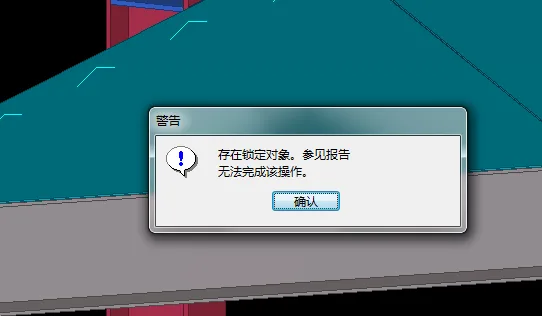
I have fully unlocked these components, including welds, cuts, bolts, and other related elements, but the problem persists. (Note: Steel columns and beams adjacent to these components are unaffected.)
To troubleshoot this issue, I have tried the following methods:
1. Verified the model integrity, which came out clean.
2. Displayed and unlocked all objects in the model including welds, bolts, cuts, concrete, etc.
3. Consulted the Tekla help documentation regarding locking and attempted the recommended steps: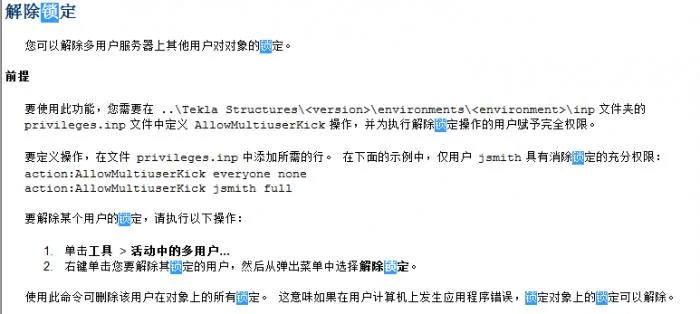
4. Modified the privileges in the ‘.inp’ file, as shown below:
5. Performed a model dump, then created a new model and imported the data, but the problem remained.
6. Copied the model folder and opened it in a newer version of Tekla, still unable to modify the components.
Currently, all locking options in the default user-defined properties for these problematic components are set to “No,” as shown below: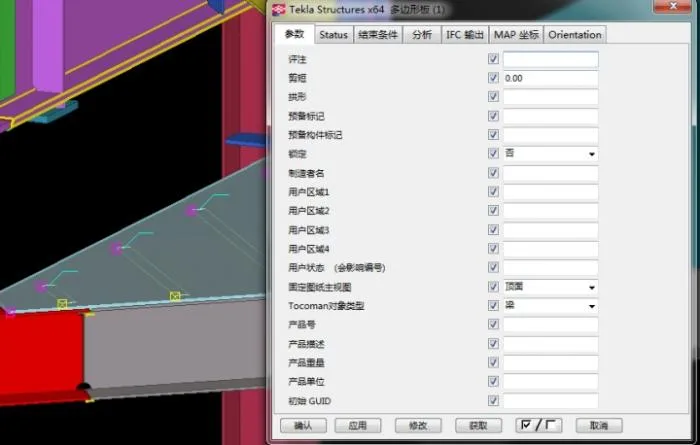
You can toggle the lock options between “Yes” and “No,” but no matter how many times you change them, these components still cannot be deleted or modified—they always prompt that the object is locked. Interestingly, if you copy the locked object to a different location, the copy can be modified without restriction.
This issue has been ongoing for several days, significantly delaying the project since the model cannot be updated. If anyone knows a solution, please share it. Thank you very much.
Update (July 17, 2015): Unfortunately, it seems there is no definitive solution to this problem. We have had to work around it using other methods, which has resulted in a lot of additional work.
















Must log in before commenting!
Sign Up