
BIM Q&A | Lumion 6 Configuration Issues
When opening a scene in Lumion 6, the image quality can only be set to the lowest level. Selecting the medium quality setting results in blackened and blurry images. Could this be due to an underpowered graphics card or a software compatibility problem?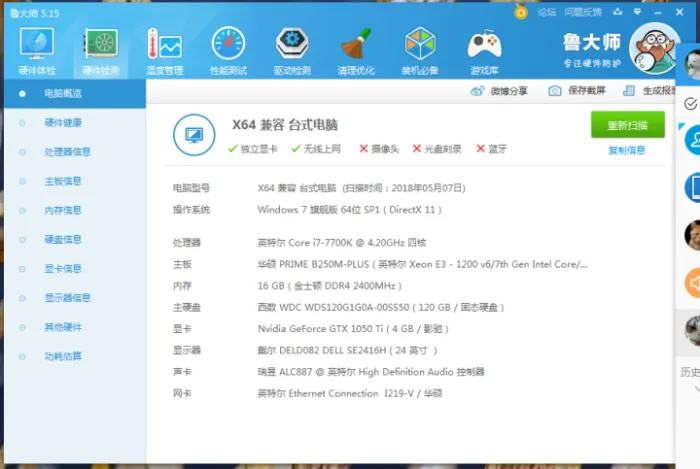
System Specifications:
- Operating System: Windows 7 Ultimate 64-bit SP1 (DirectX 11)
- Processor: Intel Core i7-7700K @ 4.20GHz (quad-core)
- Motherboard: ASUS PRIME B250M-PLUS (Intel Xeon E3-1200 v6/7th Gen Intel Core/DRAM Register 591F-200 Series chipset)
- Memory: 16 GB Kingston DDR4 2400MHz
- Main Storage: Western Digital WDC WDS120 G1G0A-00SS50 (120GB SSD)
- Graphics Card: Nvidia GeForce GTX 1050 Ti (4GB)
- Display: Dell SE2416H, 24 inches
- Sound Card: Realtek ALC887 @ Intel High Definition Audio Controller
- Network Card: Intel Ethernet Connection I219-V

xuebim
Follow the latest BIM developments in the architecture industry, explore innovative building technologies, and discover cutting-edge industry insights.
← Scan with WeChat















Must log in before commenting!
Sign Up