

1. Plugin Introduction
Autodesk Revit Extensions, also known as the Revit Speed Bo plugin package, is a powerful enhancement toolkit designed to work seamlessly with Revit.
This plugin package offers a wide range of features that boost collaboration efficiency among designers. It also integrates practical web services and dependable design content. Note that this version is compatible only with 64-bit operating systems. If you’re interested, give it a try!
Features of the Speedy Plugins
– Additional product features that extend and enhance software functionality.
– Integrated web services to improve collaboration and support sustainable design.
– Reliable design content, including specialized libraries and tools that enrich visualization and rendering capabilities.
Speedobo Plugin Functions
1. Draw Lines: Apply hand-drawn graphic styles to the current view or use a defined view template to apply styles across multiple views.
2. Anti-Aliasing: In the “Options” dialog, the “Use Anti Aliasing” setting is now “Use Anti Aliasing to Smooth Lines.” You can enable anti-aliasing for all or selected views in your project. Corresponding settings in Revit.ini let you predefine these options for users.
3. Ray Tracing Improvements: The interactive rendering style “ray tracing” now delivers faster, higher-quality, and smoother renderings with improved color accuracy and shadows on all backgrounds.
4. Formulas:
– Exp(x): Previously calculated as 10^x, now correctly calculates as e^x.
– Ln(x): Natural logarithm (base e) is now expressed as ln(x).
5. Revit Platform Enhancements: These improvements apply across all Revit versions:
Software Features
– Adaptive shelving creation
– Parameterized curved stairs and double helix stairs
– Building exterior skin creation
– Panel deformation and deformation statistics
– Force analysis
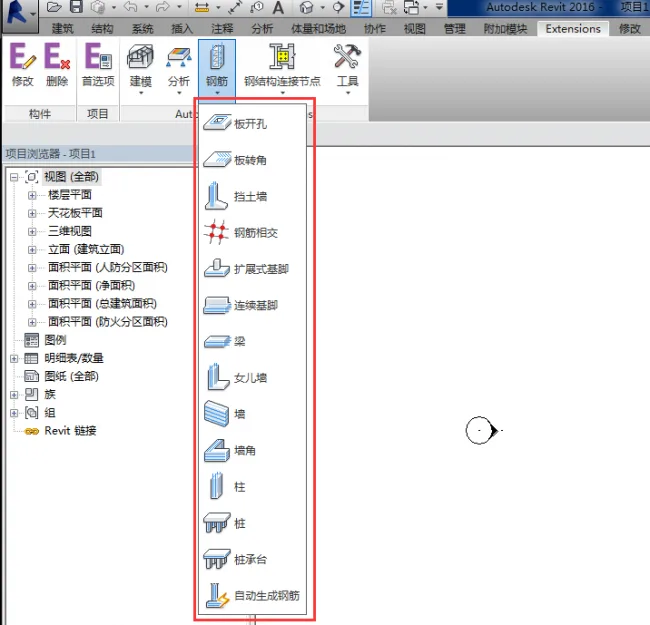
– Steel bar generation
– Steel structure connection nodes
– Various small tools
Usage Instructions
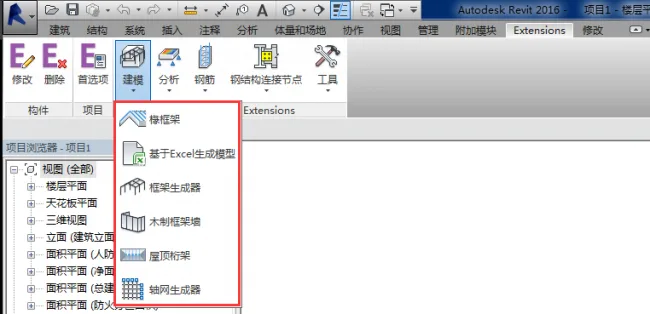
1. Open the required software and click on modeling, which includes models generated from Excel, framework generators, and more.
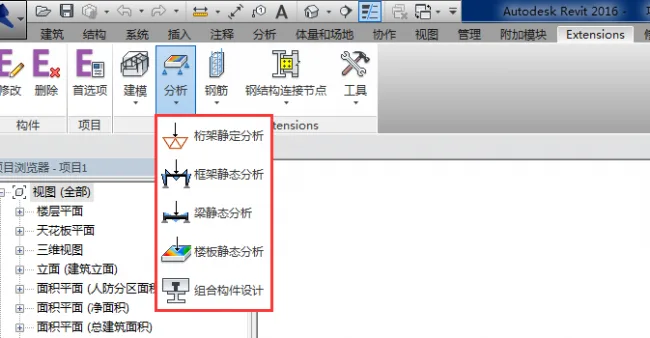
2. Analysis tools include frame static analysis, beam static analysis, transverse static analysis, composite component design, etc.
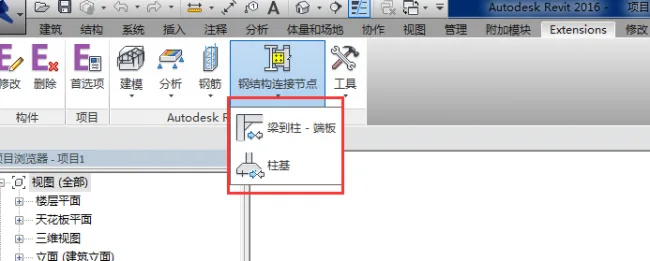
3. Steel structure connection points cover beam-to-hanging end plates, hanging foundations, and similar elements.
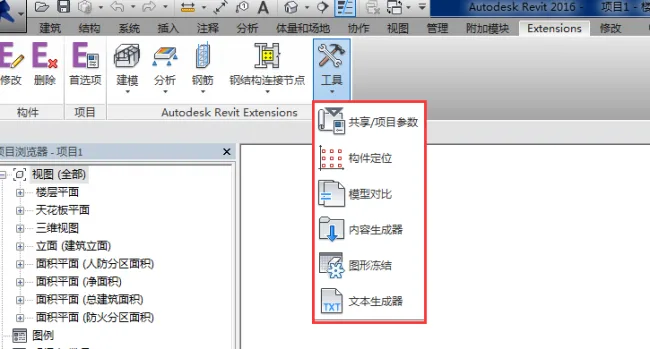
4. Additional tools include sharing options, project parameters, component positioning, model comparison, content generation, and text generation.
2. Plugin Installation Guide
Introduction to Plugin Installation
This guide uses the 2016 edition as an example:
– Plugin size: 211MB (667MB after decompression). The installer is a self-extracting EXE program.
Below is the Revit 2016 Turbo Plugin decompression interface:
Installation process:
After installation, the Revit interface appears as shown below:
3. Demonstration of Rebar Generation Using the Plugin
Quickly and automatically generate steel bars through the Revit plugin.
Step 1: Create a Simple Beam and Column Model
Step 2: Reinforce Beams and Columns – Select the structural columns requiring reinforcement, as shown in the illustration.
Step 3: Set Basic Parameters for Reinforcing Structural Columns
The plugin loads graphic information from the existing Revit model, including identification, size, and position of structural columns. Consequently, many parameters in this dialog are grayed out and cannot be modified.
Note: If “Save data but do not save generated reinforcement” is unchecked, reinforcement will be generated and displayed in Revit. If checked, reinforcement data is saved (usable after restarting the extension), but the reinforcement will not be displayed.
Step 4: Click OK to Add Steel Bars to Other Components Sequentially
Important: The reinforcement function is widely used in Superb to improve steel bar generation efficiency. However, it’s important to note that using both Revit’s built-in reinforcement and the Superb plugin together may better represent steel bar performance.
Unless there is a specific need, it is not recommended to model all steel bars exhaustively.












Must log in before commenting!
Sign Up