
isBIM Master is a localized feature plugin set based on Autodesk Revit software, launched by isBIM and Shanghai Bicheng Information Technology Co., Ltd. in August 2015. This plugin extends and enhances Revit’s modeling, modification, and other functions across various specialties such as architecture, structural engineering, plumbing, electrical, HVAC, and interior decoration. It significantly improves users’ efficiency in model creation while enhancing accuracy and standardization.
isBIM Master helps users establish a professional and precise BIM model database that supports the entire process—from product positioning, design, bidding, and procurement to construction management, project sales, delivery and acceptance, customer usage, and operation and maintenance.
The plugin is divided into several modules:
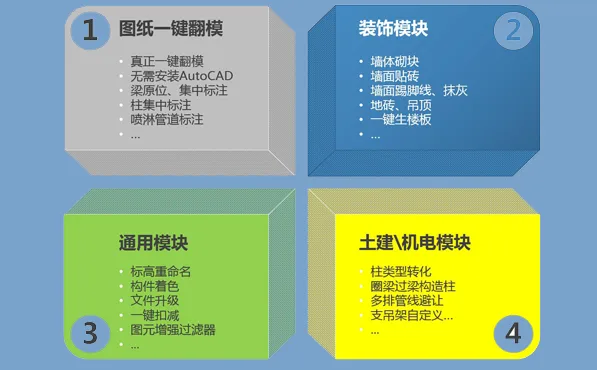
- Universal Module: Designed to provide useful, practical, and user-friendly tools for design engineers, addressing some limitations of Revit during modeling.
- Quick Modeling Module: Enables rapid flipping of DWG drawings, efficiently extracting linked or imported DWG data and converting it into Revit BIM models with accuracy.
- Structural Modeling Module: Focuses on modifying model components and quickly creating elements like ring beams, lintels, and structural columns to establish accurate, standard-compliant models.
- Mechanical and Electrical Pipeline Module: Addresses the complex, repetitive tasks involved in pipeline creation by offering efficient, streamlined functions that boost designers’ and engineers’ productivity.
- Decoration and Renovation Module: Provides operations such as wall tiling, masonry, floor slab splitting, and plastering for floors, partitions, and ceilings, significantly reducing manual modeling time.
- Drawing Module: Fully based on Revit models, it allows quick and flexible annotation and drawing of construction documents.
Software Features
- One-Click Drawing Flipping
Achieve true one-click mold flipping without intermediate format conversion. The system requires no AutoCAD installation and supports multiple drawing types. Features include beam flipping formwork with in-situ and centralized annotation, as well as pipe labeling and fire hazard level marking for spray pipes. - Accurate Modeling
Automatically creates component types, cuts models post-flipping, and assigns names and numbers. It also performs comprehensive checks for model errors, omissions, collisions, and missing elements. - Advanced Technology
Includes intelligent model creation, model inspection and analysis, flexible model optimization, and powerful Excel interaction capabilities. - Innovation and Efficiency
Offers an efficient toolkit, supports QR code technology application and promotion, allows enterprise-level custom development, and maximizes modeling efficiency and model value.
Update Notes
Functionality Optimizations
- Wall Blocks: Added top surface inclination feature.
- Wall Tiling: Introduced shared parameters inside walls and optimized mortar joints.
- 3D Local: Users can now opt out of creating new views.
- Irregular Columns and Abutments: Added multi-layer selection and completion prompts after mold flipping.
- Component Color: Interface logic improved.
- Attribute Addition (Parameter Grouping): Added settings for grouping parameters.
- Quick Filtering (Component Selection): Added component type filtering options.
- Beam and Column Flipping: Algorithm optimized for improved performance.
- Component QR Code: Users can customize parameters displayed in QR codes.
New Features Added
- Component Plagiarism Check: Detects overlapping components within a project.
- Color Brush: Marks different parameters of specific component types with distinct colors (e.g., boards at different elevations).
- Beam Coloring: Highlights unfavorable beam heights and net heights to assist MEP teams with comprehensive pipeline adjustments.
- Beam Plastering: Adds plastering functionality to beams.
- Auxiliary Line Creation: Allows creation of auxiliary lines and placement of components within rooms.
- One-Click Addition of Louvers: Automatically adds louvers at the ends of rectangular ducts, with louvers adapting in size to the air outlet.
- Power Duct: Facilitates power duct creation.












Is it free?
Free download is provided, and whether there is a charge is determined by the publisher.
Is there a cracked version available?
What is the BIM decompression password
Updated, no need to unzip password.