
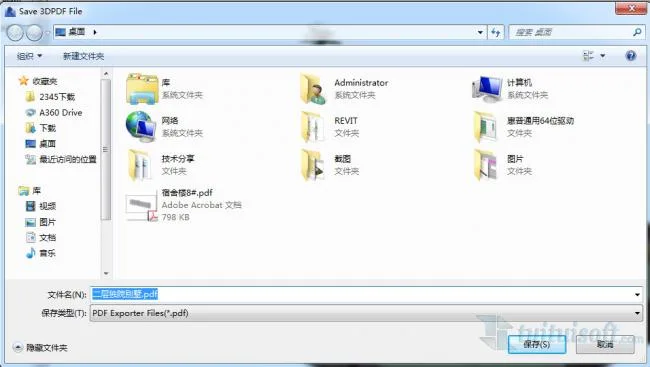
1. Navigate to the 3D view you want to print, then click “Export” under the add-ons menu.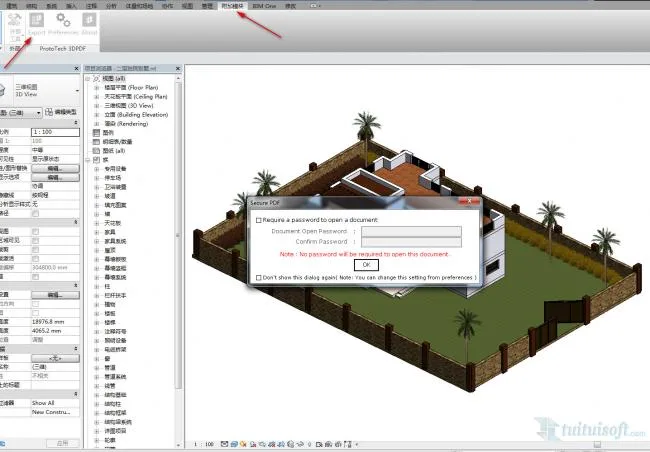
2. Choose the destination folder where you want to save the file.
3. The file has been saved successfully.
4. Open and view the exported 3dPDF file.
1. Navigate to the 3D view you want to print, then click “Export” under the add-ons menu.
2. Choose the destination folder where you want to save the file.
3. The file has been saved successfully.
4. Open and view the exported 3dPDF file.
 Revit Quick Modeling: Automatically Partition and Generate Floor Slabs from Beam and Column Enclosures
 Revit Quick Modeling: Efficient Wall Creation with Linked CAD Drawings for Door and Window Placement
 Revit Quick Modeling: Automatically Generate Beams from Linked CAD Layers
 Revit Quick Modeling: Rapid Column Creation from Linked CAD Layers
Follow the latest BIM trends in the construction industry, with BIM insights, practical tips, and real-world skills on a professional BIM learning platform.
 Designing a Secluded Home with a 2.5-Meter Narrow Space and a Captivating Staircase Linking Diverse Lifestyles2025-04-29
 The Wabi Sabi Experience: Designing a Natural Villa Beneath an Inverted Roof in a Poetic Forest2025-04-29
 Layered Light and Shadow: A Slope-Side Vacation Home Inspiring Endless Imagination2025-04-28
 Embracing Tranquil Poetry and Natural Textures in a Dreamy Home Design2025-04-27
 A Villa Nestled in Urban Alleyways: A Timeless Home Filled with Family Love2025-04-26
 A Tranquil Vacation Home Nestled Amidst Lush Surroundings with Hidden Red Gemstones2025-04-25
 A Unique Blend of Concrete and Wood for a Serene Residential Retreat2025-04-24
 Vacation Home Designs Inspired by Natural Wells and Caves, Capturing Time Through Light and Shadow2025-04-24

Must log in before commenting!
Sign Up