BIM World
A Professional BIM Learning Platform


BIM Plugin: Download Tool to Import Models from Tekla to Revit

BIM Plugin: Download Tool to Import Models from Tekla to Revit

Technical Support, Download with Confidence
0 Dollar

How does TEKLA import Revit files?

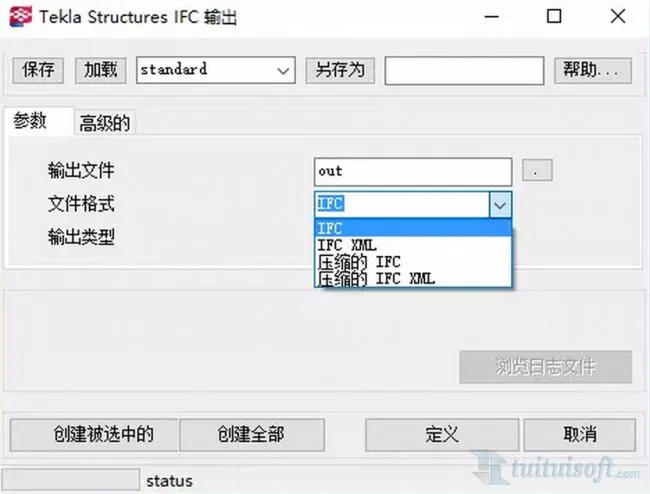
Method 1: Tekla → IFC → Revit

First, export the Tekla model to the IFC format.
BIM Plugin | Import From Tekla To Revit Download

Then, import the Tekla IFC files into Revit by linking them.

However, importing Tekla files this way can lead to some issues:

BIM Plugin | Import From Tekla To Revit Download

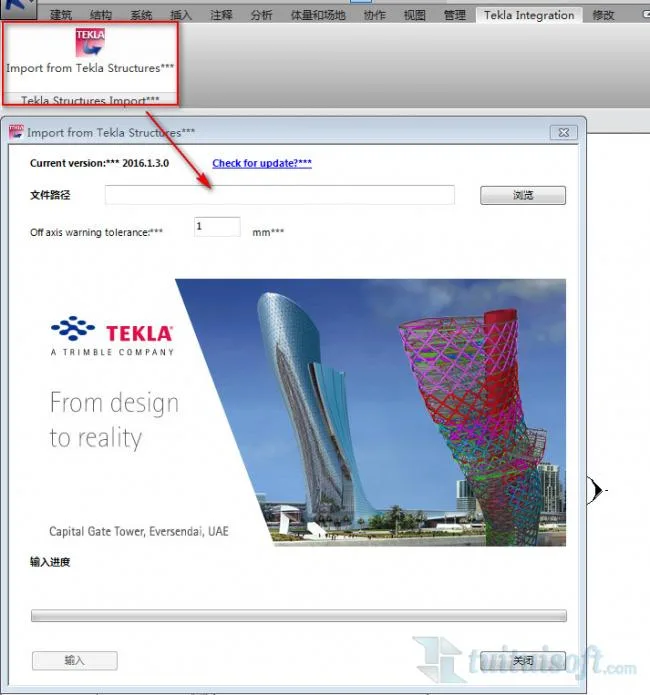
Method 2: Direct Import via Plugin (Tekla → Revit)

Use the plugin to import directly: open the “Import from Tekla Structures” tab, then load the Tekla file.

BIM Plugin | Import From Tekla To Revit Download

资源下载此资源仅限注册用户下载,请先
技术支持,放心下载!

  • Resource Name: BIM Plugin: Download Tool to Import Models from Tekla to Revit
  • Resource Tags:

Comment Get first!

Must log in before commenting!


BIM World, A Professional BIM Learning Platform

Stay updated on the latest architecture trends and share new building technologies.

Contact UsAbout Us

觉得文章有用就打赏一下小编吧

非常感谢你的打赏,我们将继续提供更多优质内容,让我们一起创建更加美好的网络世界!

支付宝扫一扫

微信扫一扫

Account Login

By signing in, you agree toUser Agreement

Sign Up









