
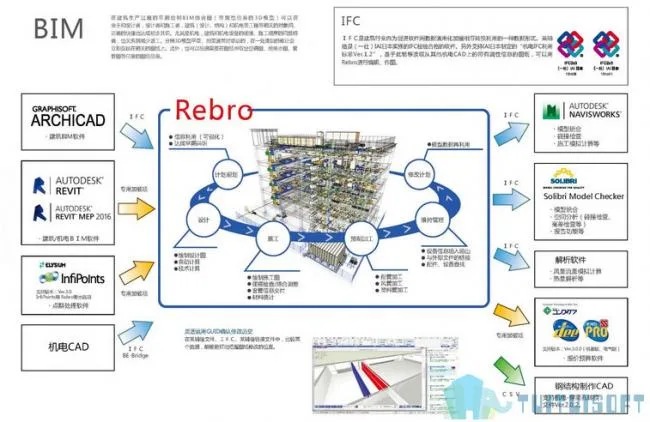
This product is an Autodesk® Revit® 2018 add-in (plugin) designed for seamless data exchange between architectural, mechanical, and electrical CAD software called “Rebro” (hereafter referred to as “Rebro”), while preserving the model’s professional attributes unchanged.
Mechanical and electrical objects created in Laifu Network can be edited directly in Revit. Similarly, these objects can be imported from Revit® into Laifu Network, allowing for smooth collaboration between platforms.
– **Laifu Network ⇒ Revit**: Imports mechanical and electrical piping, ducts, electrical (3D) equipment, and other elements drawn in Laifu Network with full property data into Revit.
– **Revit ⇒ Laifu Network**: Imports building and mechanical/electrical models created in Revit, along with their properties, into Laifu Network.
The Laifu Link uses specialized file formats for data exchange: import files (*.RedroLinkToRevit) and export files (*.RedroLinkFromRevit). These files are lightweight but carry extensive attribute information.
Once the file is read in Revit, users can perform material statistics and model editing. When opened in Laifu Network, a variety of commands become available, such as model addition, collision detection, piping resistance calculation, and pressure loss calculation.
**Note:** This plugin uses a custom installer instead of the standard App Store installer.
### Plugin Features
1. **3D Model Data**
Generate plans, sections, detailed drawings, and various professional documents from a single data model tailored to different purposes. Due to the frequent synchronization between drawings and CG data, any correction in one drawing instantly updates all related drawings in real-time.
2. **High Precision Drawing**
In 3D space, the plugin ensures the integrity of planes and sections, accurately reproducing features such as piping slopes.
3. **Rich Material Library**
Comes with an extensive library of real product materials and offers an independent platform to add accessories. Users can customize the material library content to fit their needs.
4. **Unique Mapping Modes**
Supports two modes: design and construction. This functionality meets the requirements of design units for scheme and construction drawing designs, as well as the needs of construction sites for detailed modification and adjustment of construction drawings.












Must log in before commenting!
Sign Up