
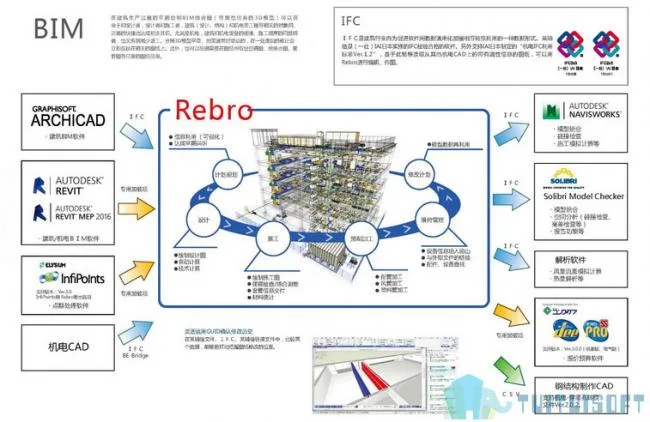
This product is an Autodesk® Revit® 2018 add-in (plugin) designed for seamless data exchange between architectural, mechanical, and electrical CAD software “Rebro” (hereinafter referred to as “Rebro”) while preserving the professional attributes of the model.
Mechanical and electrical objects created in Laifu Network can be edited directly in Revit, or alternatively, main building or mechanical and electrical objects made in Revit® can be imported into Laifu Network.
**Data Exchange Capabilities:**
– **Laifu Network ⇒ Revit:** Imports mechanical and electrical piping, ducts, electrical (3D) equipment, and other components created in Laifu Network, complete with properties, into Revit.
– **Revit ⇒ Laifu Network:** Imports building models and mechanical and electrical models designed in Revit, along with their properties, into Laifu Network.
The Laifu Link file includes import (*.RedroLinkToRevit) and export (*.RedroLinkFromRevit) files, which are specialized formats for data exchange between Revit and Laifu. Despite being lightweight, these files can carry extensive attribute information.
After loading the file into Revit, users can perform material statistics and model editing. When opened with Laifu Network, various operations such as model addition, collision detection, piping resistance calculation, and pressure loss analysis can be conducted within the model.
**Note:** This application uses a custom installer rather than the standard App Store installer.
—
### Plugin Features
1. **3D Model Data**
Generate plans, sections, detailed drawings, and various professional documents from a single model dataset tailored to different purposes. Thanks to frequent data linkage between drawings and CG, any correction made to one drawing is automatically updated across all related drawings in real time.
2. **High Precision Drawing**
Ensures integrity between planes and sections in 3D space. Accurately replicates piping slope treatments for precise modeling.
3. **Rich Material Library**
Comes with an extensive library of real product materials and offers an independent platform for adding accessories. Users can customize the material library content to suit their needs.
4. **Unique Mapping Modes**
Supports both design and construction modes. This dual-mode approach meets the requirements of design firms for schematic and construction drawings, as well as the needs of construction sites for detailed drawing adjustments and refinements.












Must log in before commenting!
Sign Up