
Software Introduction
TSRMEP is a 3D modeling software designed for plumbing, HVAC, and electrical systems, developed by Beijing Explorer Software Co., Ltd. It is built on the Autodesk BIM platform Revit and tailored to meet the plumbing and electrical standards, drawing conventions, and design practices commonly used in China. The software simplifies the creation of horizontal and vertical pipes, enables quick pipeline connections and edits, and ensures precise integration between sanitary fixtures and pipes, nozzles and pipes, as well as equipment and pipes.
TSRMEP systematically establishes piping and equipment for air and water systems and facilitates the parameterization of models for cable trays, equipment, cables, and more. It offers comprehensive image libraries featuring air vents, air valves, water valves, and other components. Additionally, it includes extensive warehouses for sanitary ware, valves, accessories, and nozzles for water supply and drainage professionals. The software also provides commonly used symbol, equipment, and component libraries for electrical engineering, allowing for fast connections between equipment and conduits.
With a suite of specialized tools, TSRMEP allows users to easily edit and modify models. It enables quick adjustments to air duct and water pipe connections, ensures accurate equipment-to-pipeline integration, and is suitable for designing plumbing and electrical systems at preliminary and construction drawing stages.
Features
1. System Management
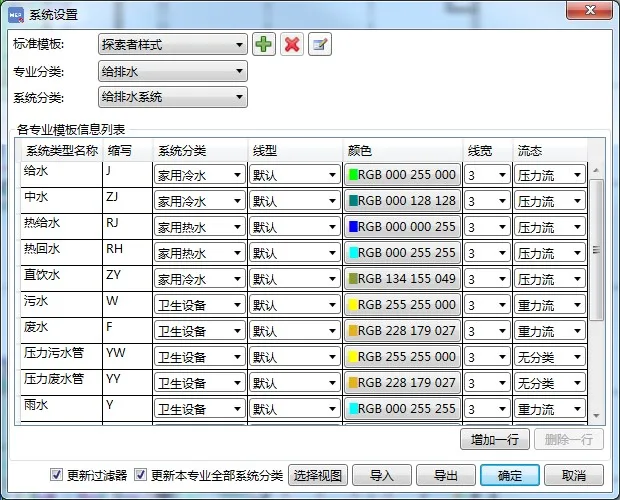
The default system classification in Revit often falls short of engineering design requirements. TSRMEP addresses this by organizing templates tailored to various professional applications, based on industry drawing standards and project-specific needs. Users can update system settings of the current drawing with a single click and have full support for importing and exporting templates.
2. MEP Main Entity Drawing and Connection
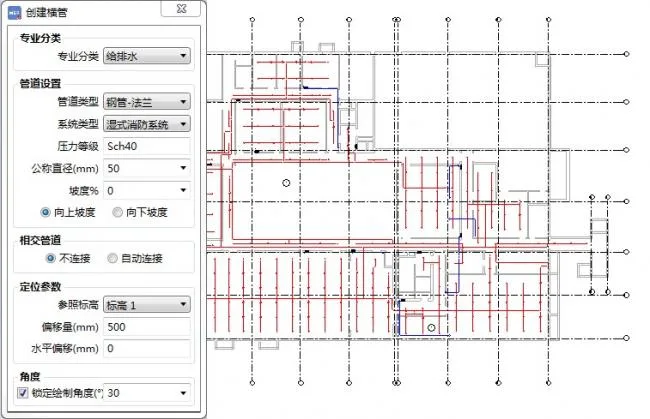
Taking into account the working habits of Chinese designers, TSRMEP enhances the creation process of MEP main entities by assigning extensive parameter information. It offers a wide range of professional components and multiple connection methods that comply with actual engineering demands and connection standards. This flexibility supports varied positional relationships between main entities for seamless integration.
3. Organized Family Library Layout
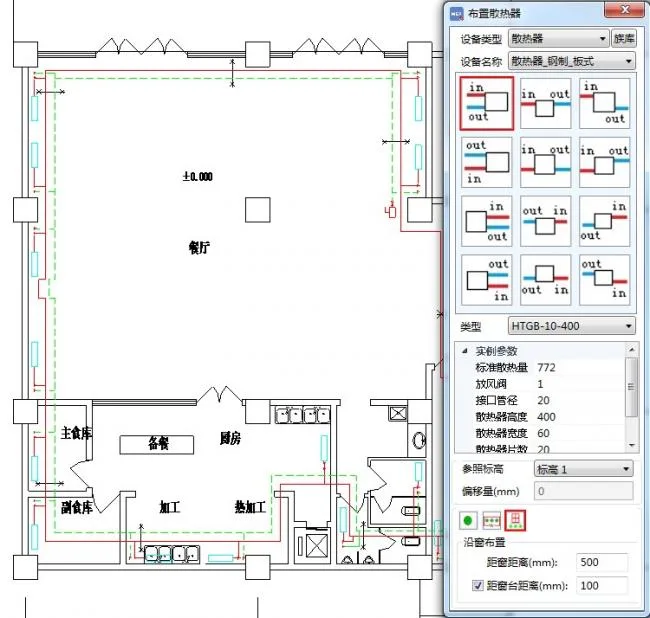
Unlike Revit’s default family loading method, TSRMEP categorizes family files by profession and usage type. The dropdown menu provides access to multiple family files within each category, simplifying arrangement. Users can arrange families arbitrarily or in lines, with some families offering specialized arrangement options along walls and windows to suit professional characteristics.
4. Multi-Disciplinary Collaborative Design
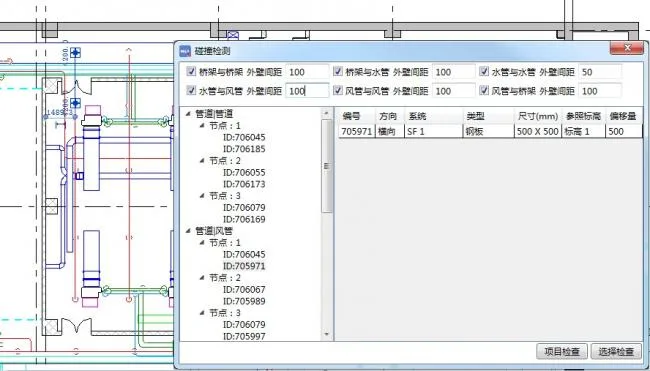
One key advantage of 3D design is the ability to collaborate across multiple disciplines. TSRMEP leverages comprehensive model information to facilitate clash detection between pipelines of different specialties. It identifies collision points within specified ranges based on avoidance rules, allowing users to click on node details to locate clashes and promptly adjust pipelines to meet design requirements.
5. Professional Calculations
The latest version includes calculation capabilities for water supply and drainage, HVAC, and electrical disciplines. These functions align with current Chinese standards such as “Design Specification for Automatic Sprinkler Systems GB50084-2001 (2005 edition)”, “Technical Specification for Fire Water Supply and Hydrant Systems GB50974-2014”, “Practical Heating and Air Conditioning Design Manual (Second Edition)”, “Design Specification for Heating, Ventilation, and Air Conditioning of Civil Buildings GB/T 50736-2012”, “Industrial and Civil Power Distribution Design Manual (Fourth Edition)”, and “Lighting Design Manual (Third Edition)”.
Calculations are divided into numerical and geometric combination models and calculation tools. Models are created based on combined numerical and geometric data and calculated according to requirements. Results are fed back into the original model and can be saved as formatted documents. Calculation tools allow quick input of results based on initial conditions, guiding further system design.
6. Material Statistics
TSRMEP supports detailed quantity takeoff by discipline, with customizable statistical ranges and margins. Users can export results in Excel format or display statistical tables directly within the model view for convenient review.












Must log in before commenting!
Sign Up