
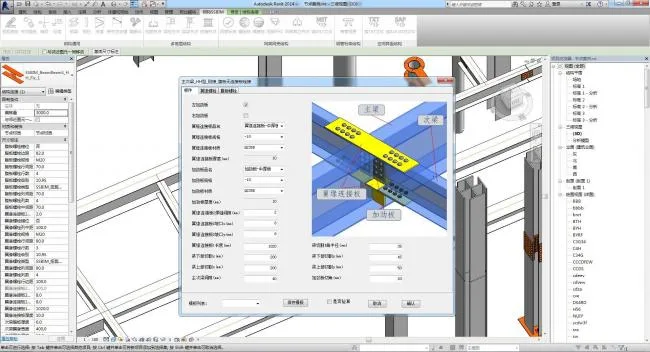
Update Record:
2019-03-30 V2.7 Update:
- Optimized the function for picking lines to build beams.
- Improved the creation process for light steel wire molds.
- Enhanced wedge-shaped beam column components.
- Refined parameters for original light steel nodes.
- Added 10 new light steel nodes.
V2.6 Update:
- Optimized node insertion method and removed model line restrictions.
- Added the “SSBIM Construction Drawing” module.
- Included 133 node construction drawings for multi-level buildings.
- Added 17 specialized symbols.
- Added 16 weld seam annotations.
- Fixed several node parameter issues.
V2.5 Update:
- Enhanced automatic modeling by reading TXT files, improving compatibility with TXT files exported from SSBIM for AutoCAD.
- Added batch import function for external custom files of box, H-shaped, and circular pipe sections.
- Introduced 9 new types of beam-to-beam and beam-to-column nodes.
- Optimized some beam nodes for compatibility with edge beam nodes.
- Fixed various user feedback issues.
V2.4 Update:
- Upgraded software verification method—now verification is done directly by scanning a QR code, without manual selection.
- Simplified software operation prompts.
- Updated the section library for hot-rolled H-beams, T-beams, and other parts according to the latest standards.
- Fixed certain node issues.
V2.3 Update (June 15, 2018):
- Corrected beam eccentricity issues in beam-column nodes.
- Modified parameters for composite columns.
- Fixed automatic grid module generation errors.
- Added version number prompt.
V2.2 Update:
- Officially rebranded SSBIM to “SSBIM for Revit,” adding “SSBIM for Tekla.”
- After updating to the new version, the “Steel Structure Map” app requires synchronous upgrade; the old SSBIM version does not require app updates.
- Fixed issues with node family parameter linking.
V2.1 Update (April 11, 2018):
- Added 16 framework support nodes.
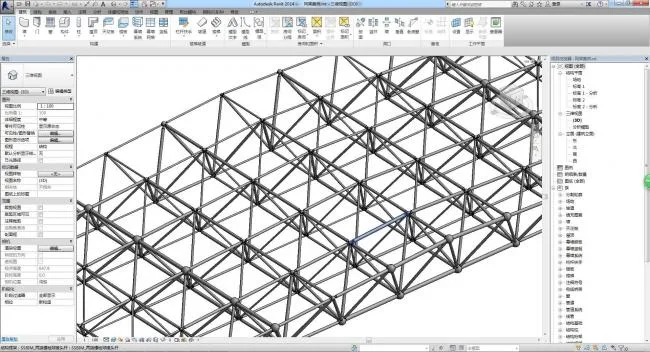
- Included nodes for non-bolted and welded balls in grid structures.
- Enabled calculation of cross-sectional properties for various steel structural components, including custom and composite sections.
- Added several stiffening rib families.
- Fixed bolt problems in certain light steel nodes.
- Resolved various user feedback issues.
V2.0 Update (March 13, 2018):
- Multi-level Structure Enhancements:
– Supported nodes increased from 4 to 25.
– Column base nodes increased from 10 to 12.
– Beam-column nodes increased from 15 to 32.
– Beam-beam nodes increased from 5 to 19.
– Splicing nodes increased from 14 to 29.
– Added a “support node” module with 15 support nodes.- Introduced a “light steel structure” module including 7 support nodes.
- Expanded the grid specification library.
- Fixed multiple software issues.
SSBIM For Revit Installation Instructions
Steel Structure SSBIM is a BIM application for steel structures built on the Revit platform. Currently, two versions are available: SSBIM2014 and SSBIM2016, designed for Revit 2014 and Revit 2016 respectively. The SSBIM2014 version is further divided into 32-bit and 64-bit editions.
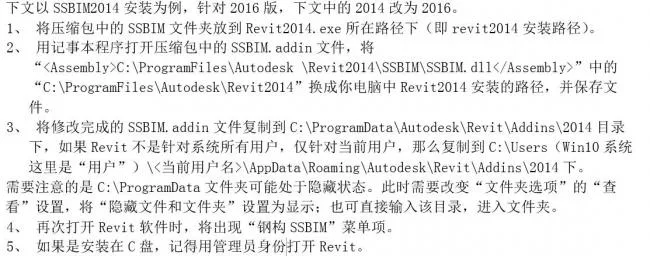
Installation Steps for SSBIM For Revit:
Introduction to SSBIM For Revit Features:
The “Steel Structure SSBIM” includes the following key functional areas:

1. General Steel Structure Menu Group
Steel Structure Modification: Select components or nodes created by SSBIM in the 3D view, then modify parameters in the dialog box and confirm to apply changes. Batch modification of multiple components of the same type is supported.
Node Copy: Select an existing SSBIM node in the 3D view, follow prompts to select components, and perform node copying.
Grid: Input parameters to create a data table, then generate either a rectangular or fan-shaped grid. You can specify the insertion point and initial rotation angle to position the grid precisely.
Elevation: Enter parameters to create a data table and generate the elevation levels for each floor simultaneously.
Steel Beam: Create steel beams by capturing start and end points in structural plan views or by selecting components in elevation or 3D views. Supports various section types including composite sections, with options for section alignment and corner settings.
Steel Column: Create various steel column components in structural plan views, including composite and structural columns. Set top and bottom elevations, plane offsets, and corner configurations.
Support: Create steel support components by capturing start and end points in structural plans or selecting components in elevation or 3D views. Supports multiple section types including composite sections, with alignment and corner options.
Node Supported: Create steel support components with nodes in a 3D view, including support components and node components at both ends.
Components: Insert family instances of component families used across various steel structural systems.
Tip: When creating components or nodes, use the “Save Template” or “Template List” dropdown to save parameters or load saved templates to create identical or similar components efficiently.
2. Multi-Level and High-Rise Structure Menu Group
Column Base Nodes: Includes various column base nodes for multi-story steel structures, covering both rigid and hinged column section types.
Beam-Column Nodes: Create different types of beam-column connection nodes for multi-story steel structures, including rigid and hinged types with various beam and column section configurations.
Beam-Beam Nodes: Create primary and secondary beam connection nodes for multi-story steel structures.
Splicing Nodes: Generate splicing nodes for beams or columns within multi-story steel structures.
3. Grid Mesh Structure Menu Group
Grid Standard: Set the standard library of grid components used in the current project.
Bolt Ball: Insert a bolt ball node of selected specifications on the work plane by capturing intersection points on imported CAD line models.
Welding Ball: Insert a welding ball node of selected specifications on the work plane by capturing intersection points on imported CAD line models.
Grid Members: By capturing ball nodes at both ends, the node ball types are automatically identified to create corresponding grid members. Bolt balls receive sleeves, cones, or sealing plates according to bolt specs, and bolt ball nodes are sheared. Welded balls are welded at member ends.
Other Grid Structure Nodes: Create family instances of related node families within the spatial grid structure system.
Read MST File: Import log text files generated by MST space grid structure design software to automatically generate structural models.
4. Steel Pipe Truss Structure Menu Group
Bent Pipe Intersections: Addresses Revit’s inability to intersect and shear bent pipes by adding a straight hollow body inside the bent pipe.
5. Space Irregular Structure Menu Group
Read TXT File: Reads TXT files containing line model geometry and section specifications generated in AutoCAD to automatically create structural models. (See separate documents for AutoCAD generation instructions.)
Read SAP2000 File: Reads s2k command-line files generated by SAP2000 to automatically create structural models.
SSBIM is still in its early stages, and the journey ahead is long. We hope you will join us along the way!












Must log in before commenting!
Sign Up