
The layout function of Revit’s volume is one of the most versatile features. Interestingly, the official classic secondary development tutorials hardly cover this topic. However, based on my experience developing plugins for bridges, I found that irregular structures are easier to handle using volumes or adaptive component families. Therefore, I want to share some insights on this subject.
Essentially, the layout function in an adaptive component family works the same way as in a mass.
Let’s start by discussing the APIs available for layout in Revit volumes:
- Generate geometry using contour and direction:
Form NewExtrusionForm(bool isSolid, ReferenceArray profile, DB.XYZ direction); - Generate faces using contour lines:
Form NewFormByCap(bool isSolid, ReferenceArray profile); - Create volumes from surfaces and vectors:
Form NewFormByThickenSingleSurface(bool isSolid, Form singleSurfaceForm, DB.XYZ thickenDir); - Generate volumes using contour groups:
Form NewLoftForm(bool isSolid, ReferenceArrayArray profiles); - Create geometry using layout paths and contour groups:
Form NewSweptBlendForm(bool isSolid, ReferenceArray path, ReferenceArrayArray profiles);
One challenge is obtaining the ReferenceArray. After investigation, I found it can be obtained by appending modelCurve.GeometryCurve.Reference to the profile.
For detailed examples, please refer to the source materials.
What practical uses do these APIs have? They are very valuable in developing plugins, such as those for modeling prestressed steel strands or terrain.
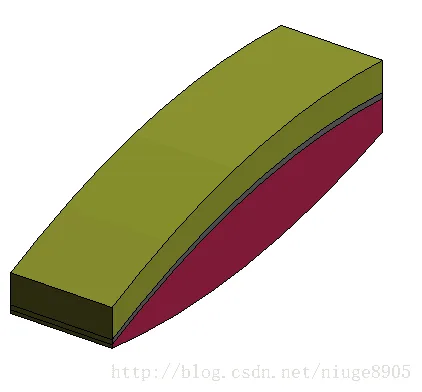
As shown above, this example demonstrates generating a terrain map shaped like pork belly. Another example includes generating prestressed steel strands.
In fact, the core code behind both examples relies on the five APIs mentioned earlier.















Must log in before commenting!
Sign Up