
Revit requires Teigha’s open-source DLL to read text data from CAD files. To set this up, add a reference to the DLL file highlighted in red in the image below within your project. Place all other DLL files in the same folder. When running the application, these DLL files will be automatically copied to the bin directory. Additionally, when running the plugin inside Revit, Revit will automatically load these DLL files.
Below are the key methods used to extract CAD text, layer, and geometric information within Revit:
using System;
using System.Collections.Generic;
using System.Linq;
using System.Text;
using System.Threading.Tasks;
using Autodesk.Revit;
using Autodesk.Revit.DB;
using Autodesk.Revit.UI;
using CreatBridgeForRevit2018.ElementsSelect;
using CreatBridgeForRevit2018.Filter;
using Teigha.Runtime;
using Teigha.DatabaseServices;
using System.IO;
using System.Collections;
using Teigha.Geometry;
namespace CreatBridgeForRevit2018.ReadCAD
{
class ReadCADUtils
{
/// <summary>
/// Gets the path of the linked CAD file
/// </summary>
/// <param name="cadLinkTypeID"></param>
/// <param name="revitDoc"></param>
/// <returns></returns>
public string GetCADPath(ElementId cadLinkTypeID, Document revitDoc)
{
CADLinkType cadLinkType = revitDoc.GetElement(cadLinkTypeID) as CADLinkType;
return ModelPathUtils.ConvertModelPathToUserVisiblePath(cadLinkType.GetExternalFileReference().GetAbsolutePath());
}
/// <summary>
/// Retrieves text information from a CAD file
/// </summary>
/// <param name="dwgFile"></param>
/// <returns></returns>
public List<CADTextModel> GetCADTextInfo(string dwgFile)
{
List<CADTextModel> listCADModels = new List<CADTextModel>();
using (new Services())
{
using (Database database = new Database(false, false))
{
database.ReadDwgFile(dwgFile, FileShare.Read, true, "");
using (var trans = database.TransactionManager.StartTransaction())
{
using (BlockTable table = (BlockTable)database.BlockTableId.GetObject(OpenMode.ForRead))
{
using (SymbolTableEnumerator enumerator = table.GetEnumerator())
{
while (enumerator.MoveNext())
{
using (BlockTableRecord record = (BlockTableRecord)enumerator.Current.GetObject(OpenMode.ForRead))
{
foreach (ObjectId id in record)
{
Entity entity = (Entity)id.GetObject(OpenMode.ForRead, false, false);
CADTextModel model = new CADTextModel();
switch (entity.GetRXClass().Name)
{
case "AcDbText":
Teigha.DatabaseServices.DBText text = (Teigha.DatabaseServices.DBText)entity;
model.Location = ConverCADPointToRevitPoint(text.Position);
model.Text = text.TextString;
model.Angel = text.Rotation;
model.Layer = text.Layer;
listCADModels.Add(model);
break;
case "AcDbMText":
Teigha.DatabaseServices.MText mText = (Teigha.DatabaseServices.MText)entity;
model.Location = ConverCADPointToRevitPoint(mText.Location);
model.Text = mText.Text;
model.Angel = mText.Rotation;
model.Layer = mText.Layer;
listCADModels.Add(model);
break;
}
}
}
}
}
}
}
}
}
return listCADModels;
}
/// <summary>
/// Retrieves layer names from the CAD file
/// </summary>
/// <param name="dwgFile"></param>
/// <returns></returns>
public IList<string> GetLayerName(string dwgFile)
{
IList<string> cadLayerNames = new List<string>();
using (new Services())
{
using (Database database = new Database(false, false))
{
database.ReadDwgFile(dwgFile, FileShare.Read, true, "");
using (var trans = database.TransactionManager.StartTransaction())
{
using (LayerTable lt = (LayerTable)trans.GetObject(database.LayerTableId, OpenMode.ForRead))
{
foreach (ObjectId id in lt)
{
LayerTableRecord ltr = (LayerTableRecord)trans.GetObject(id, OpenMode.ForRead);
cadLayerNames.Add(ltr.Name);
}
}
trans.Commit();
}
}
}
return cadLayerNames;
}
/// <summary>
/// Retrieves lines from the CAD file, including lines, polylines, and arcs
/// </summary>
/// <param name="dwgFile"></param>
/// <returns></returns>
public List<CADGeometryModel> GetCADCurves(string dwgFile)
{
List<CADGeometryModel> listCADModels = new List<CADGeometryModel>();
using (new Services())
{
using (Database database = new Database(false, false))
{
database.ReadDwgFile(dwgFile, FileShare.Read, true, "");
using (var trans = database.TransactionManager.StartTransaction())
{
using (BlockTable table = (BlockTable)database.BlockTableId.GetObject(OpenMode.ForRead))
{
using (SymbolTableEnumerator enumerator = table.GetEnumerator())
{
while (enumerator.MoveNext())
{
using (BlockTableRecord record = (BlockTableRecord)enumerator.Current.GetObject(OpenMode.ForRead))
{
foreach (ObjectId id in record)
{
Entity entity = (Entity)id.GetObject(OpenMode.ForRead, false, false);
CADGeometryModel geoModel = new CADGeometryModel();
switch (entity.GetRXClass().Name)
{
case "AcDbPolyline":
Teigha.DatabaseServices.Polyline pl = (Teigha.DatabaseServices.Polyline)entity;
IList<XYZ> listPoints = new List<XYZ>();
for (int i = 0; i < pl.NumberOfVertices; i++)
{
listPoints.Add(new XYZ(MillimetersToUnits(pl.GetPoint2dAt(i).X), MillimetersToUnits(pl.GetPoint2dAt(i).Y), 0));
}
PolyLine polyLine = PolyLine.Create(listPoints);
listCADModels.Add(new CADGeometryModel() {CadPolyLine= polyLine,LayerName=pl.Layer });
break;
case "AcDbLine":
Teigha.DatabaseServices.Line line = (Teigha.DatabaseServices.Line)entity;
Autodesk.Revit.DB.Line revitLine = Autodesk.Revit.DB.Line.CreateBound(ConverCADPointToRevitPoint(line.StartPoint), ConverCADPointToRevitPoint(line.EndPoint));
listCADModels.Add(new CADGeometryModel() {CadCurve=revitLine as Autodesk.Revit.DB.Curve ,LayerName=line.Layer});
break;
case "AcDbArc":
Teigha.DatabaseServices.Arc arc = (Teigha.DatabaseServices.Arc)entity;
double enda, stara;
if (arc.StartAngle > arc.EndAngle)
{
enda = arc.StartAngle;
stara = arc.EndAngle;
}
else
{
enda = arc.EndAngle;
stara = arc.StartAngle;
}
Autodesk.Revit.DB.Arc revitArc = Autodesk.Revit.DB.Arc.Create(Autodesk.Revit.DB.Plane.CreateByNormalAndOrigin(new XYZ( arc.Normal.X, arc.Normal.Y, arc.Normal.Z),
ConverCADPointToRevitPoint(arc.Center)), MillimetersToUnits(arc.Radius), stara, enda);
listCADModels.Add(new CADGeometryModel() { CadCurve = revitArc as Autodesk.Revit.DB.Curve, LayerName = arc.Layer });
break;
default:
break;
}
}
}
}
}
}
}
}
}
return listCADModels;
}
/// <summary>
/// Converts millimeters to Revit internal units (feet)
/// </summary>
/// <param name="value"></param>
/// <returns></returns>
private double MillimetersToUnits(double value)
{
return UnitUtils.ConvertToInternalUnits(value, DisplayUnitType.DUT_MILLIMETERS);
}
/// <summary>
/// Converts a CAD point to a Revit XYZ point
/// </summary>
/// <param name="point"></param>
/// <returns></returns>
private XYZ ConverCADPointToRevitPoint(Point3d point)
{
return new XYZ(MillimetersToUnits(point.X), MillimetersToUnits(point.Y), MillimetersToUnits(point.Z));
}
}
}
Additional DLL files must be referenced. The DLLs inside the red box in the image below should be added to your Visual Studio references, while the rest should be placed in the debug folder.

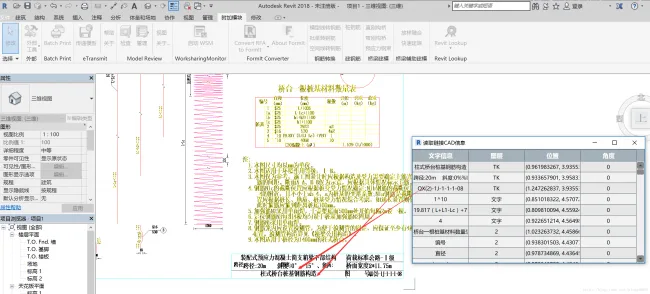
The output results demonstrate that CAD layer information, text positions, and geometric data are accurately read within Revit:














Must log in before commenting!
Sign Up