
The terrain in Revit is essentially just a surface without any special features. To create this surface, you can use the following method:
Form NewFormByCap(bool isSolid, ReferenceArray profile);
If you want to create a solid form, such as a pork belly shape, use this method instead:
Form NewLoftForm(bool isSolid, ReferenceArrayArray profiles);
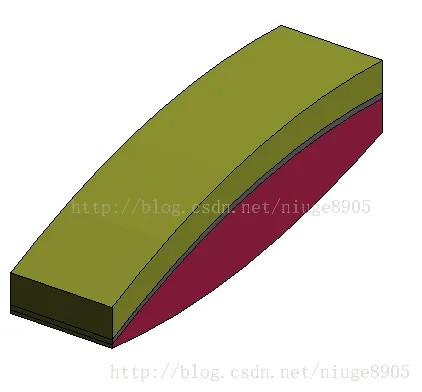
Here is the code example to create a terrain surface:
using System;
using System.Collections.Generic;
using System.Linq;
using System.Text;
using System.Threading.Tasks;
using Autodesk.Revit.UI;
using Autodesk.Revit.DB;
using Autodesk.Revit.UI.Selection;
using Autodesk.Revit.ApplicationServices;

namespace Terrain
{
    [Autodesk.Revit.Attributes.Transaction(Autodesk.Revit.Attributes.TransactionMode.Manual)]
    [Autodesk.Revit.Attributes.Journaling(Autodesk.Revit.Attributes.JournalingMode.NoCommandData)]
    [Autodesk.Revit.Attributes.Regeneration(Autodesk.Revit.Attributes.RegenerationOption.Manual)]
    public class Class1 : IExternalCommand
    {
        public Result Execute(ExternalCommandData commandData, ref string message, ElementSet elements)
        {
            Document revitDoc = commandData.Application.ActiveUIDocument.Document; // Get document
            Application revitApp = commandData.Application.Application; // Get application

            using (Transaction transaction = new Transaction(revitDoc))
            {
                transaction.Start("Create Terrain");
                // Core code starts here

                // Since CurveByPoints cannot form a closed loop, create two curves:
                ReferencePointArray refPointArray = new ReferencePointArray();
                ReferencePointArray refPointArray2 = new ReferencePointArray();

                ReferencePoint referencePoint1 = revitDoc.FamilyCreate.NewReferencePoint(new XYZ(0, 0, 0));
                ReferencePoint referencePoint2 = revitDoc.FamilyCreate.NewReferencePoint(new XYZ(100, 0, 0));
                ReferencePoint referencePoint3 = revitDoc.FamilyCreate.NewReferencePoint(new XYZ(100, 100, 0));
                ReferencePoint referencePoint4 = revitDoc.FamilyCreate.NewReferencePoint(new XYZ(0, 100, 0));

                refPointArray.Append(referencePoint1);
                refPointArray.Append(referencePoint2);
                refPointArray.Append(referencePoint3);
                refPointArray.Append(referencePoint4);

                CurveByPoints curve1 = revitDoc.FamilyCreate.NewCurveByPoints(refPointArray);

                refPointArray2.Append(referencePoint1);
                refPointArray2.Append(referencePoint4);
                CurveByPoints curve2 = revitDoc.FamilyCreate.NewCurveByPoints(refPointArray2);

                ReferenceArray profile = new ReferenceArray();
                profile.Append(curve1.GeometryCurve.Reference);
                profile.Append(curve2.GeometryCurve.Reference);

                Form form = revitDoc.FamilyCreate.NewFormByCap(true, profile);

                transaction.Commit();
                // Core code ends here
            }
            return Result.Succeeded;
        }
    }
}
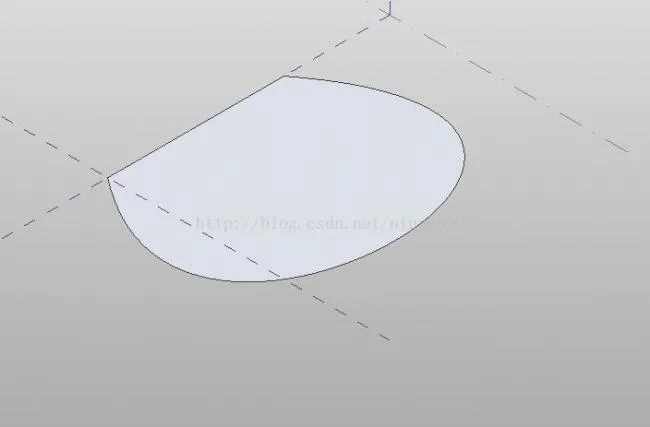
The result is displayed in the following image:
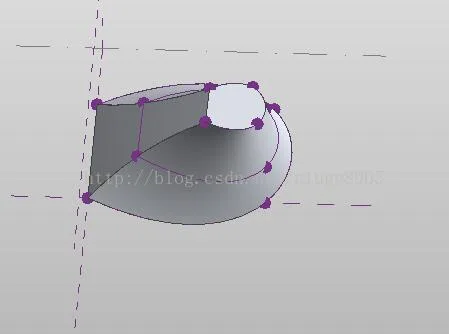
To create a terrain surface with contour lines, use the following API as the core:
Form NewFormByCap(bool isSolid, ReferenceArray profile);
The effect looks like this:
If you want to convert it into a solid form, use:
Form NewLoftForm(bool isSolid, ReferenceArrayArray profiles);

xuebim
Follow the latest BIM developments in the architecture industry, explore innovative building technologies, and discover cutting-edge industry insights.
← Scan with WeChat














Must log in before commenting!
Sign Up