
From development to completion, working with mathematics is essential. Revit, a 3D modeling software, represents the spatial relationships between different structures, and its secondary development naturally involves extensive vector calculations.
Fortunately, Revit’s API offers a wide range of built-in vector operations, making it easier for developers to utilize these functions without having to implement them from scratch.
Let’s start by exploring the available vector operation methods in the official documentation: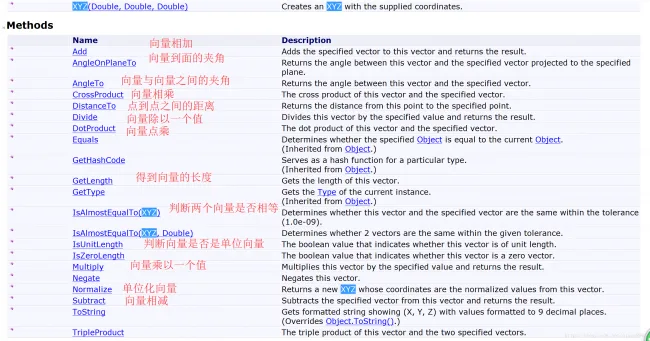
These methods allow you to perform many useful operations. For example:
XYZ vect1 = new XYZ(1, 0, 0);
XYZ vect2 = new XYZ(0, 1, 0);
XYZ vect3 = vect1.CrossProduct(vect2); // Normal vector of a surface formed by two vectors
XYZ vect4 = vect1.Subtract(vect2); // Subtracting two vectors
double angle = vect1.AngleTo(vect2); // Angle between two vectors
double aa = vect1.DotProduct(vect2); // Dot product of two vectors
double length = vect1.GetLength(); // Length of a vector
XYZ unitVect = vect1.Normalize(); // Vector normalization
Using these built-in methods, you can efficiently perform various spatial vector calculations within Revit.

xuebim
Follow the latest BIM developments in the architecture industry, explore innovative building technologies, and discover cutting-edge industry insights.
← Scan with WeChat














Must log in before commenting!
Sign Up