
First, I want to mention that I am using Python version 3.6. Copying code from online sources often leads to many errors, which can be quite frustrating. Python is constantly evolving—moving from version 2.x to 3.x, updating methods, and changing associated modules. Finding solutions often requires searching through various scattered resources.
Below is the code I ran for interacting directly with Excel:
from tkinter import Tk
from time import sleep
from tkinter import messagebox
import win32com.client as win32

warn = lambda app: messagebox.askokcancel(app, 'Exit?')
RANGE = range(3, 8)

def excel():
    app = 'Excel'
    xl = win32.gencache.EnsureDispatch(f'{app}.Application')
    ss = xl.Workbooks.Add()
    sh = ss.ActiveSheet
    xl.Visible = True
    sleep(1)

    sh.Cells(1, 1).Value = f'Python-to-{app} Demo'
    sleep(1)
    for i in RANGE:
        sh.Cells(i, 1).Value = f'Line {i}'
        sleep(1)
    sh.Cells(i + 2, 1).Value = "Th-th-th-that's all flocs!"

    warn(app)
    ss.Close(False)
    xl.Application.Quit()

if __name__ == '__main__':
    Tk().withdraw()
    excel()
Here is the final result: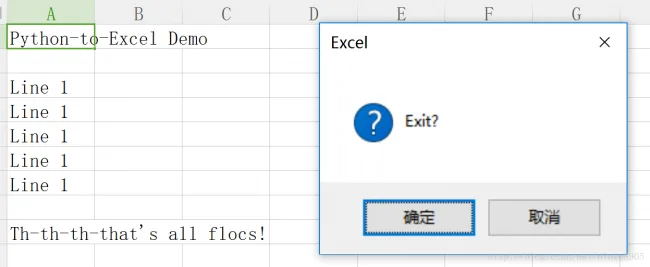
I plan to add Word integration later. This means Excel can also be integrated into Dynamo.

xuebim
Follow the latest BIM developments in the architecture industry, explore innovative building technologies, and discover cutting-edge industry insights.
← Scan with WeChat














Must log in before commenting!
Sign Up