
In Revit’s View > Visibility/Graphics settings, you can change the color of a specific component type by applying filters, as illustrated in the image below: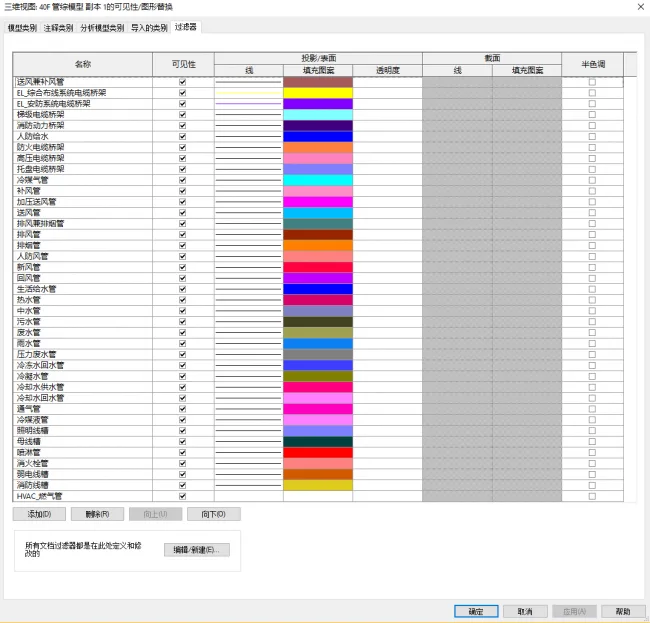
But how can we retrieve or set the colors of these filters programmatically? The Revit API offers the GetFilterOverrides() method, which requires passing an ElementId and returns an OverrideGraphicSettings object. This object allows us to access or modify filter colors and other graphical settings.
Here is a sample code demonstrating how to obtain filter colors applied to the active view:
using Autodesk.Revit.UI;
using Autodesk.Revit.DB;
using Autodesk.Revit.Attributes;
using System.Collections.Generic;
using System.IO;

namespace SettingFillPatternByCate
{
 [Transaction(TransactionMode.Manual)]
 class Command : IExternalCommand
 {
  public Result Execute(ExternalCommandData commandData, ref string message, ElementSet elements)
  {
   Document doc = commandData.Application.ActiveUIDocument.Document;
   View v = doc.ActiveView;
   StreamWriter sw = new StreamWriter(@"C:UsersAdministratorDesktopFilterColor.txt", false);
   string names = null;

   FilteredElementCollector filters = new FilteredElementCollector(doc);
   filters.OfClass(typeof(ParameterFilterElement));

   ICollection filterIds = v.GetFilters();
   Color c = new Color(255, 255, 255);

   foreach (ElementId id in filterIds)
   {
    Element filter = doc.GetElement(id);
    OverrideGraphicSettings ogs2 = v.GetFilterOverrides(id);
    c = ogs2.ProjectionFillColor;

    if (c.IsValid)
    {
     names += filter.Name + " " + id.ToString() + " (" + c.Red + "," + c.Green + "," + c.Blue + ")n";
    }
   }

   sw.Write(names);
   sw.Close();

   return Result.Succeeded;
  }
 }
}
The content of the generated FilterColor.txt file looks like this: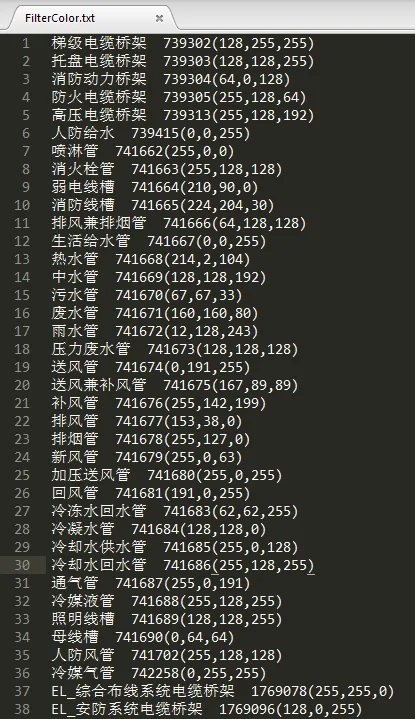
A key point to note here is the difference between two approaches used to retrieve filters from the document:
1. Using a FilteredElementCollector to gather all filters in the document:
FilteredElementCollector filters = new FilteredElementCollector(doc);
filters.OfClass(typeof(ParameterFilterElement));
2. Directly getting all filters applied to the active view:
ICollection filterIds = v.GetFilters();The first method returns all filters present in the document, regardless of whether they are applied to the current view. The second method retrieves only those filters that are actively applied to the view.
If you use the first approach and then call:
OverrideGraphicSettings ogs2 = v.GetFilterOverrides(id);you might encounter an exception stating “The filter was not applied to the view”. This happens because some filters retrieved by the first method are not applied to the current view.
Please feel free to correct any inaccuracies. Thank you very much!















Must log in before commenting!
Sign Up