
I developed a simple web crawler to collect all BIM-related job listings in first-tier and emerging first-tier cities for data analysis.
First, I searched for BIM positions on Zhilian Recruitment using Chrome. After the page loaded, I pressed Ctrl+U to view the page source but couldn’t find the job information directly in the HTML. Then, I opened the developer tools with F12, refreshed the page, filtered network requests by keywords, and discovered a data package containing the job listings.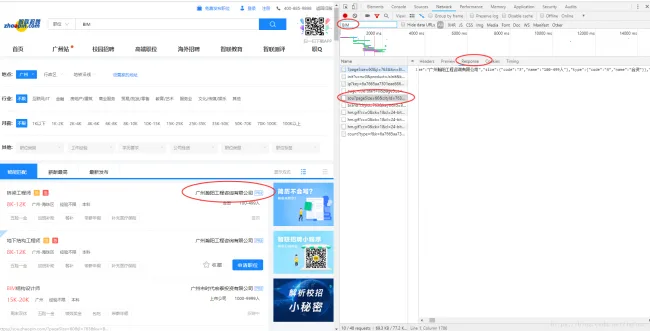
By examining the request URL of this resource, I found it followed the pattern:
‘https://fe-api.zhaopin.com/c/i/sou?’ + request parameters.
Based on this, I constructed a new URL:
‘https://fe-api.zhaopin.com/c/i/sou?pageSize=60&cityId=763&workExperience=-1&education=-1&companyType=-1&employmentType=-1&jobWelfareTag=-1&kw=造价员&kt=3’.
Copying this URL into the browser successfully retrieved the relevant data.
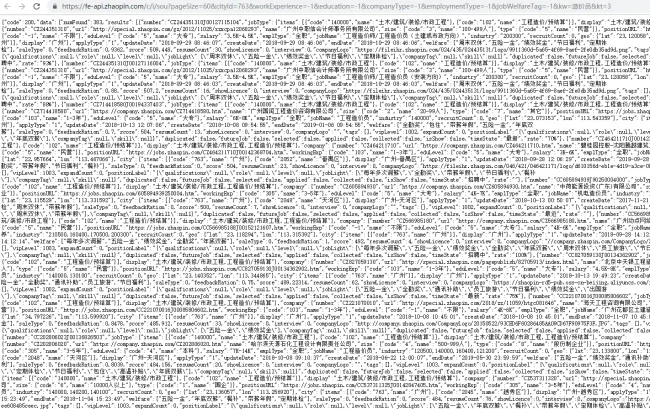
The data was returned in JSON format. I formatted the JSON, analyzed its structure, and planned the parsing logic accordingly.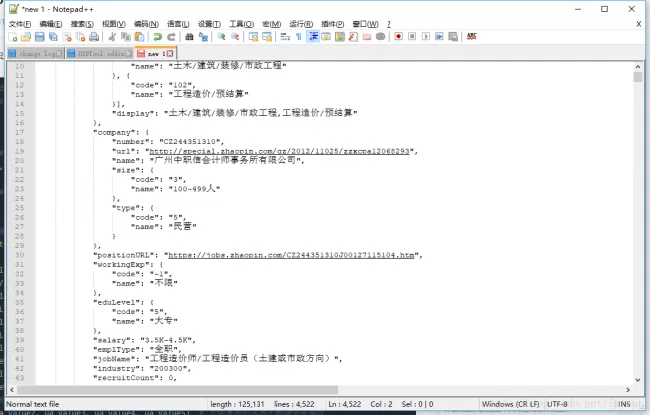
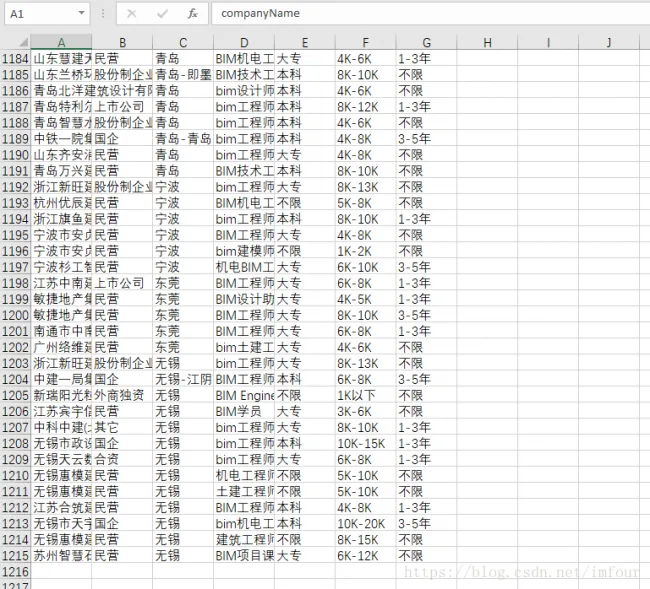
With the request URL and data structure clarified, I proceeded to implement URL construction, data parsing, and export functions in code. Ultimately, 1,215 data entries were collected, which require further organization for analysis.
Below is the Python code used for this project:
# -*- coding: utf-8 -*-
import csv
import re
import requests
import time
from urllib.parse import urlencode
from requests.exceptions import RequestException

csvHeaders = ['companyName', 'companyType', 'region', 'jobName', 'education', 'salary', 'workExperience']

def GetJobsData(cityId, keyWord, startIndex):
    '''Request job data from API'''
    paras = {
        'start': startIndex,             # Starting position
        'pageSize': '60',                # Number of items per page
        'cityId': cityId,                # City ID
        'workExperience': '-1',          # Work experience filter
        'education': '-1',               # Education level filter
        'companyType': '-1',             # Company type filter
        'employmentType': '-1',          # Employment type filter
        'jobWelfareTag': '-1',           # Job benefits filter
        'kw': keyWord,                   # Keyword search
        'kt': '3'                       # Search by job title
    }
    headers = {
        'User-Agent': 'Mozilla/5.0 (Windows NT 10.0; Win64; x64) AppleWebKit/537.36 (KHTML, like Gecko) Chrome/64.0.3282.140 Safari/537.36 Edge/17.17134',
    }
    url = 'https://fe-api.zhaopin.com/c/i/sou?' + urlencode(paras)
    response = requests.get(url, headers=headers)
    if response.status_code == 200:
        jsonData = response.json()
        return jsonData
    return None

def ParseData(jsonData, filename):
    '''Parse JSON data and export to CSV'''
    jobInfo = {}
    for i in jsonData['data']['results']:
        jobInfo['companyName'] = i['company']['name']
        jobInfo['companyType'] = i['company']['type']['name']
        jobInfo['region'] = i['city']['display']
        jobInfo['jobName'] = i['jobName']
        jobInfo['education'] = i['eduLevel']['name']
        jobInfo['salary'] = i['salary']
        jobInfo['workExperience'] = i['workingExp']['name']
        # Filter jobs containing 'BIM' in the title
        if 'BIM' in jobInfo['jobName'] or 'bim' in jobInfo['jobName']:
            WriteCsv(filename, jobInfo)
            print(jobInfo)

def CreateCsv(path):
    '''Create a CSV file and write headers'''
    with open(path, 'a', encoding='gb18030', newline='') as f:
        csvFile = csv.DictWriter(f, csvHeaders)
        csvFile.writeheader()

def WriteCsv(path, row):
    '''Write a row of data to CSV'''
    with open(path, 'a', encoding='gb18030', newline='') as f:
        csvFile = csv.DictWriter(f, csvHeaders)
        csvFile.writerow(row)

def Main(citiesId, keyWord, lastPage):
    '''Main function to run the crawler'''
    filename = 'ZL_' + keyWord + '_' + time.strftime('%Y%m%d%H%M%S', time.localtime()) + '.csv'
    CreateCsv(filename)
    for cityId in citiesId:
        startPage = 1
        while startPage <= lastPage:
            startIndex = 60 * (startPage - 1) + 1
            startPage += 1
            try:
                jsonData = GetJobsData(cityId, keyWord, startIndex)
                ParseData(jsonData, filename)
            except RequestException:
                break

if __name__ == '__main__':
    cities = ['530', '538', '765', '763', '801', '653', '736', '639', '854', '531', '635', '719', '749', '599', '703', '654', '779', '636']
    Main(cities, 'BIM', 5)
    print('Data collection complete')














Must log in before commenting!
Sign Up