
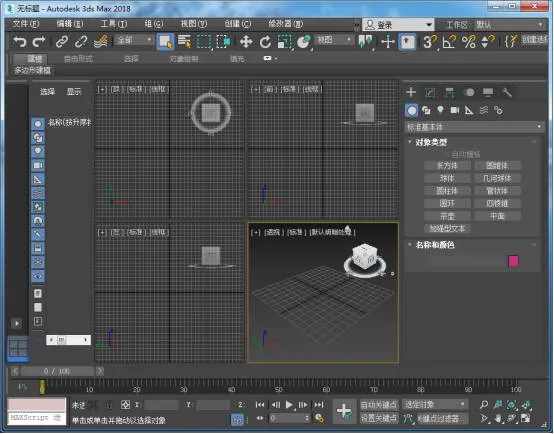
3ds Max, also known as Autodesk 3ds Max, released its latest version, 3ds Max 2018, at the end of 2017. The interface of 3ds Max 2018 has been significantly redesigned, offering a more modern look compared to the previous 2017 version.
This software is widely used for 3D modeling and rendering, serving a broad range of industries—from advertising and character design to film, animation, and both indoor and outdoor visualization. The rendering capabilities of 3ds Max 2018 are impressive. Let’s explore the new features introduced in this version.
3ds Max 2018 Simplified Chinese Version (64-bit) Features:
- View navigation now includes points of interest.
- The viewport allows for infinite scaling.
- Added local coordinate systems for points and edges.
- The mirror tool now supports geometry mode.
- UV editing can be flattened based on material IDs and smooth groups.
- Many new tools have been added to the curve editor and buffer curve.
- Added an offset controller.
- Camera sequencing feature.
- Physical Material support.
- The node material editor can sample the preview ball directly in the material editor.
- Introduced an Art Renderer.
- The Mental Ray renderer can now be installed separately.
3ds Max 2018 Simplified Chinese Version (64-bit) Installation and Registration Guide:
- After installing the 64-bit Simplified Chinese version of 3ds Max 2018, launch the software to activate.
- Select the middle option: Enter a serial number.
- Click on Activate.
- Enter the serial number and key: 066-0666666128J1.
- Open the keygen tool, then click Patch to generate a patch.
- Click the middle button on the keygen to generate an activation code.
- Paste the generated activation code into the activation box in 3ds Max and click Next.
- Once activation is complete, you can start using the software.
The 2018 user interface is sleek and modern, and it’s sure to impress users with its enhanced design.
3ds Max 2018 Software Interface











May I ask how to install 32? It still shows that 64 cannot be installed