
In Autodesk Revit, the concept of Family is fundamental. All elements in Revit are built upon families. A Revit family represents a class of elements within a specific category, grouped together based on shared sets of parameters (properties), similar usage, and comparable graphical representations. Although different elements within a family may have varying property values, the property settings themselves remain consistent.
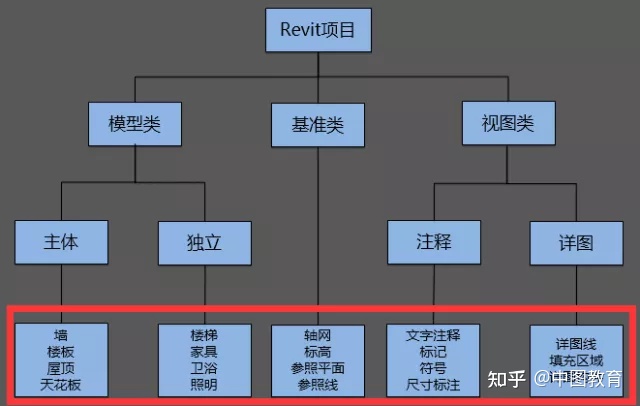
Within each family, multiple types can be defined. Depending on how the family is designed, each type may have different sizes, shapes, material settings, or other parameter variations. One of the key advantages of Autodesk Revit is that users don’t need to learn complex programming languages to create custom component families. The Family Editor allows you to build entire families using predefined templates and add parameters such as dimensions, materials, visibility controls, and more based on your needs.
Using the Family Editor, you can create realistic building components as well as graphical annotation elements.
Revit categorizes families into three types based on their creation method: system families, loadable families, and built-in families. Each family contains extensive parameter information, which serves as the core for information exchange and collaboration. The variation in parameter data results in diverse family instances, making a Revit model a composition of families with a wide range of styles. Family parameters come in different types, and altering these properties leads to different family appearances and behaviors.
Family parameters can be classified into two main groups:
(1) Family parameters: These are commonly used parameters, but they cannot appear in schedules or tags.
(2) Shared parameters: These parameters can be shared across multiple projects, reused, exported to ODBC databases, and can appear in schedules and tags.
Additionally, family parameters are divided into two categories:
(1) Type parameters: These control the entire family type. Changing a type parameter affects all instances of that type. For example, the width (b) and height (h) of a beam.
(2) Instance parameters: These affect only a single instance of a component without altering other instances of the same type, such as the material of a particular beam.
Source: Author: BIM Tutorial Website Source: BIM Tutorial Website
















Must log in before commenting!
Sign Up