
In the realm of digital BIM, numerous file formats exist, both open and closed. Open file formats can be accessed and processed by any BIM software, whereas closed formats are limited to specific programs. Importing closed formats into other software may result in loss of some stored data. Additionally, it can be challenging to identify the exact purpose of each file or understand the type of information it contains. For instance, some files are ideal for exporting lines and points, while others are better suited for 3D planes and solids.
After extensive analysis, I believe that understanding and correctly utilizing documents based on their intended purpose is a fundamental principle of BIM. In this article, we will explore the roles and applications of various file formats used in infrastructure projects supported by BIM technology.
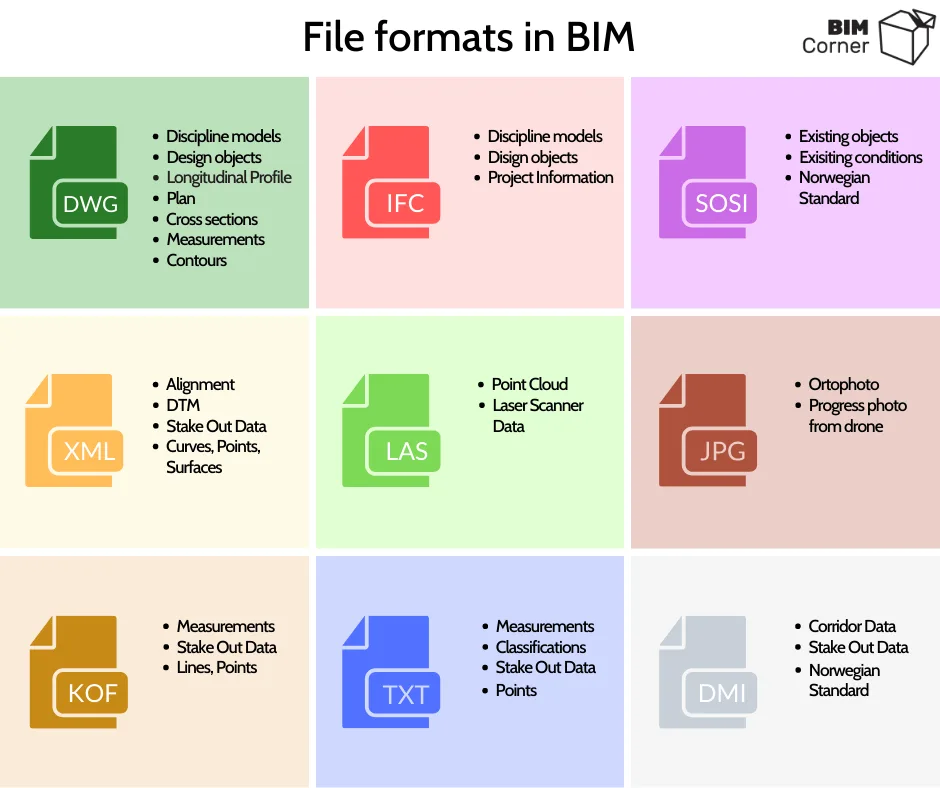
DWG: One of the key strengths of this format is its versatility. It typically stores geometric model information and design objects encoded within layer names. DWG files are often used as digital documents containing design elements such as longitudinal sections, development plans, or cross-sections. They serve as the foundation for designing geometric shapes of infrastructure including roads, railways, and sewage systems. Additionally, DWG files may incorporate GIS data, corrective maps, current situation objects, measurements, and contour plans.
IFC: Developed by BuildingSmart, IFC is commonly used in the 2×3 format, encompassing disciplinary models and design objects. Notably, IFC files can contain extensive non-geometric information. They are frequently applied in non-drawing projects, enabling extraction of data such as material quantities. Furthermore, IFC files provide valuable information for building maintenance phases.
SOSI: This is a Norwegian Standard Format (Structural Classification Object) that categorizes objects according to Norwegian standards. Each object is assigned a unique code and name.
LandXML: Primarily used to format infrastructure objects, this format describes planes, curves, and points. It can also record data related to slopes and design speeds and is often utilized by machine control systems.
LAS: LAS files are designed to record point clouds generated from laser scanning. These files tend to be large, sometimes reaching several gigabytes in size.
JPG: In infrastructure projects, drones capture high-resolution images to represent current site conditions, typically as orthophoto maps saved in JPG format. These images also document construction progress.
KOF: This measurement format contains data about names, points, and rows. For example, it might store information about the location of vertical signs or roadside measurements.
TXT: Another measurement format, TXT is used to save COGO points and is compatible with various other point types, including input files for Quadri object classification tools.
DMI/DMR: These standardized Norwegian formats provide traffic corridor data. They allow contractors to further process models, which are more flexible than DWG files. For example, adjustments can be made to account for exposed rock layers differing from initial assumptions based on design phase measurements. Contractors can edit 3D models to achieve precise earthwork calculations. The format is supported by machine control systems.
Information Levels and Types
Next, it’s important to consider the type of information contained within each file. For this purpose, the most popular formats—IFC, DWG, and LandXML—are compared alongside Quadri (MMS Model Management System), which is tailored for infrastructure.
Each of these formats shares a similar information structure, divided into multiple levels (DWG files distinguish two levels). These levels can be summarized as:
- Level 0 – Object
- Level 1 – Attributes
- Level 2 – Attributes
- Level 3 – Information
All formats support recording both geometric and non-geometric information. Geometric data typically describes elements such as:
- Curve
- Roll
- Surface
- Point
The amount of non-geometric information varies by format. Below is a closer look at the information carried by the three most common infrastructure file types.
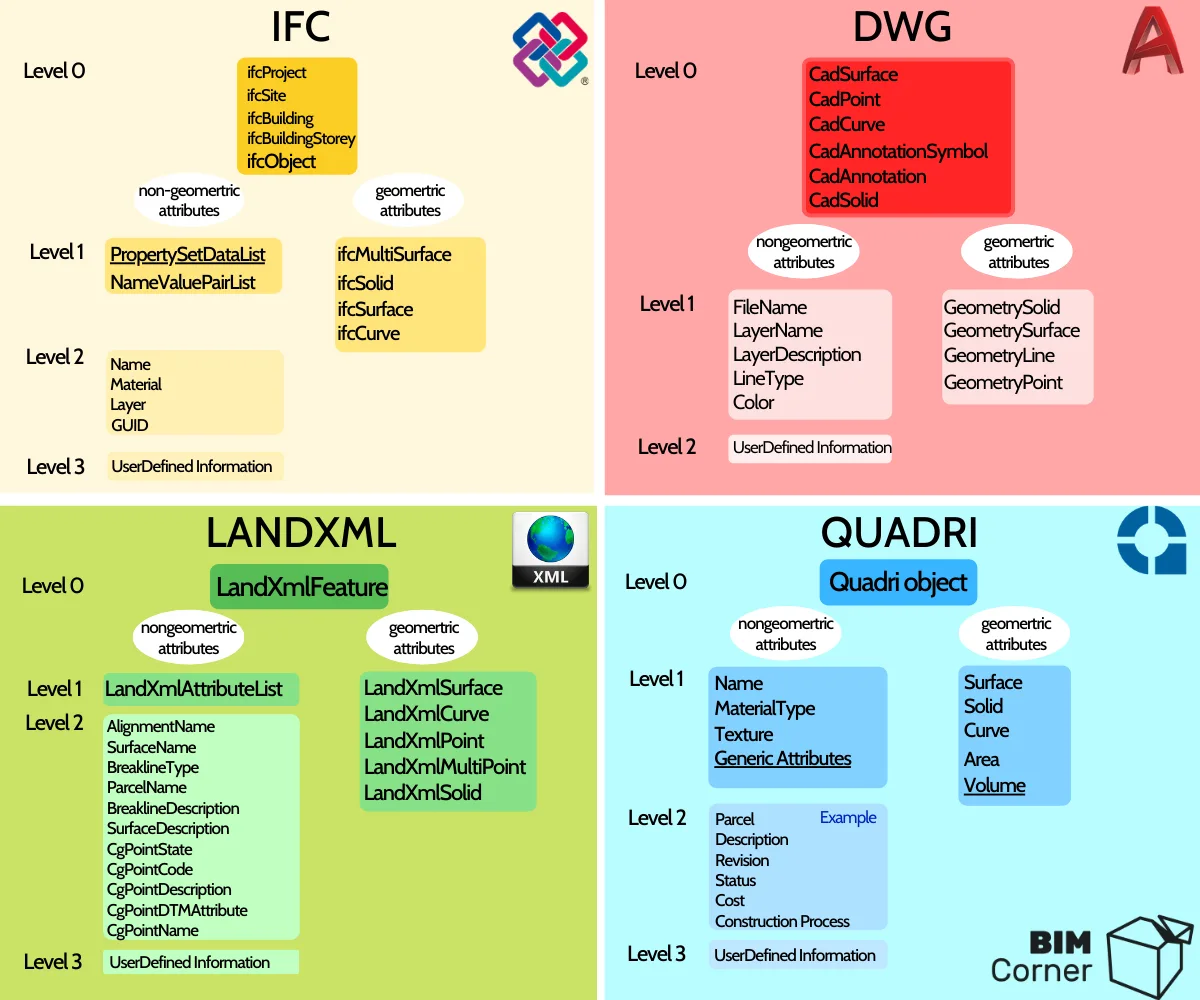
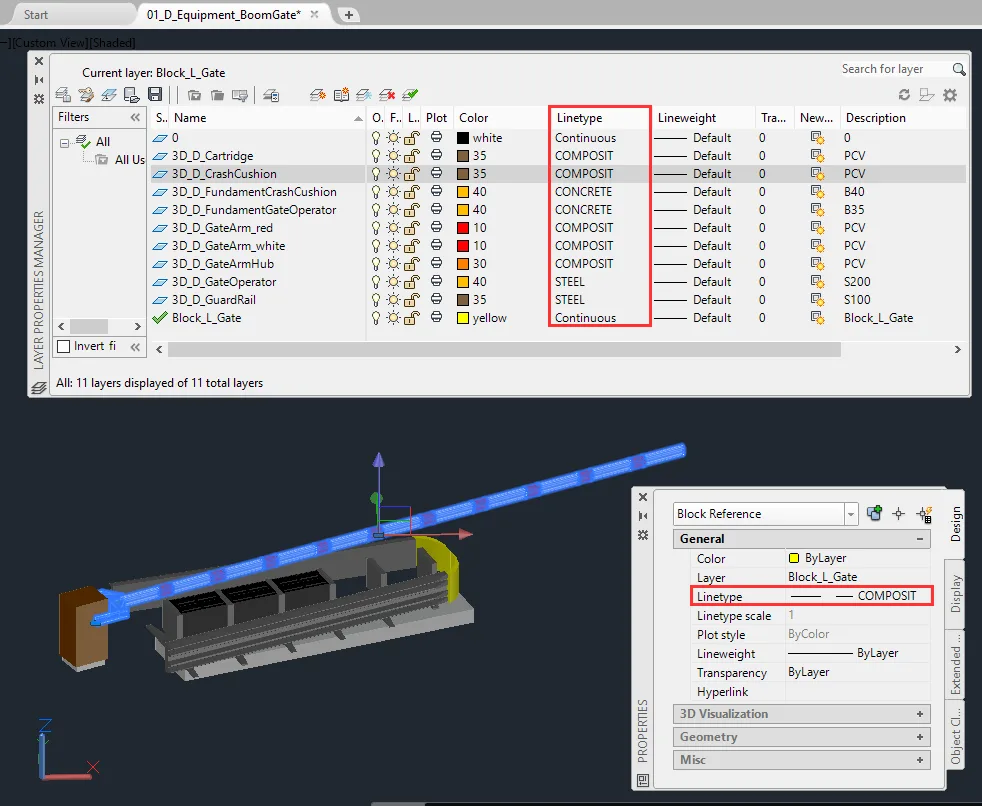
DWG: DWG files can directly record non-geometric attributes at Level 1. Relevant attributes include:
- Filename
- Layer name
- Layer description
- Linear
- Color
Encoding design information in layer names is a common practice. These descriptions often include details about object types, materials, and textures—for example, 00_S_fundant_complete_B40_t-concrete. Additional information can be encoded in linear attributes, describing line types such as ByLayer, Dashed, Continuous, or Dashdotted. AutoCAD also allows custom line types, enabling further encoding of information hidden in line names. Advanced DWG files may contain data such as LOD (Level of Detail), LOI (Level of Information), MMI, materials, and more.
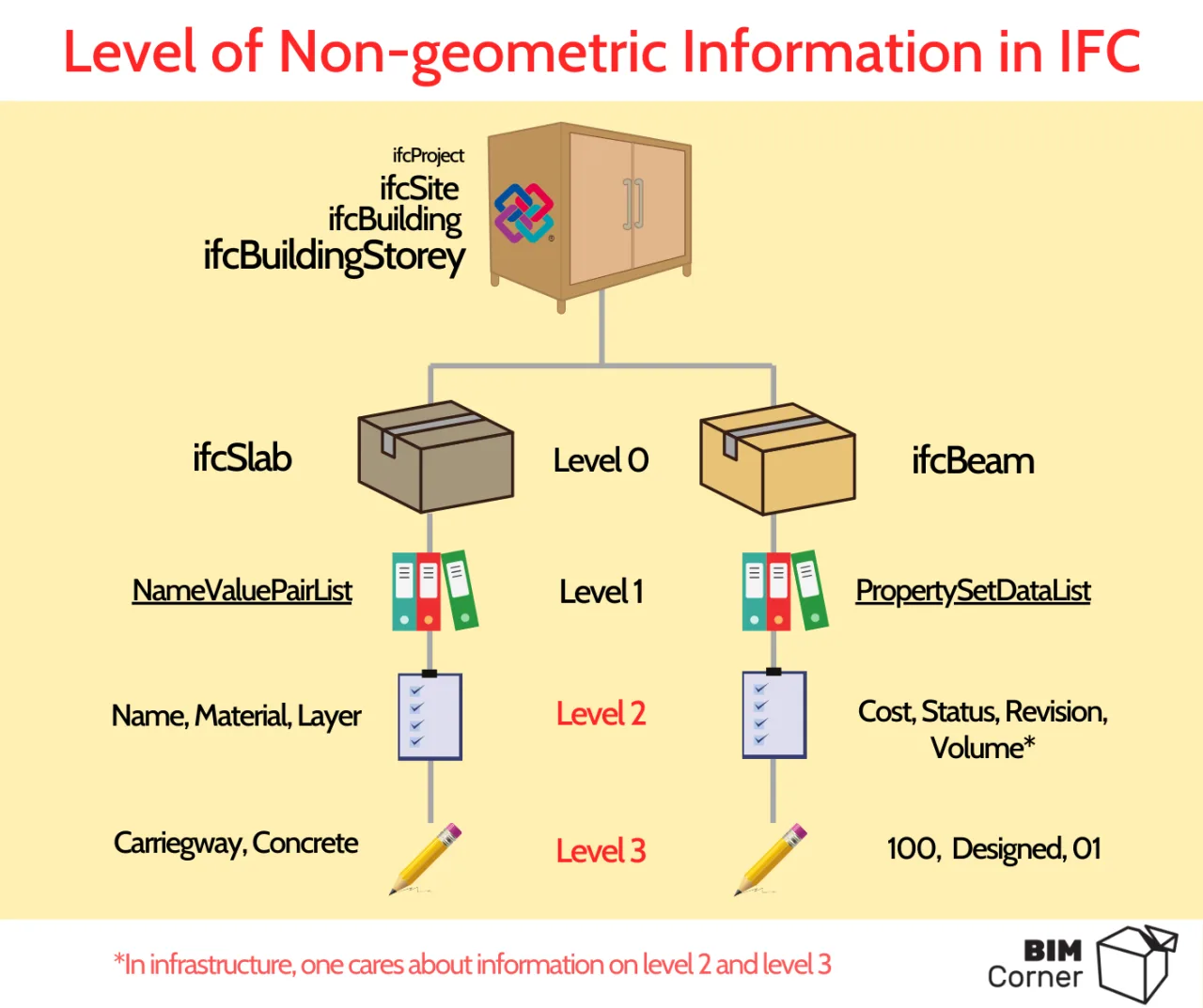
IFC: Among all listed formats, IFC files carry the most extensive non-geometric information. These are organized into three levels. At Level 0, you find objects like ifcObject and higher-level structures. For example, IfcProject is similar to AutoCAD’s Block, containing general information such as project name and software used to create the file. Detailed data describing individual project objects is stored at the lowest level. IFC supports information storage via NameValueList, which holds names, materials, layer names, or GUI-related data. The PropertySetList further allocates detailed project descriptions.
LandXML: The current LandXML version maintains three information levels, though its functionality number remains limited. GML files are the successor format. At Level 2, LandXML can include routing line names, surface names, or surface descriptions.
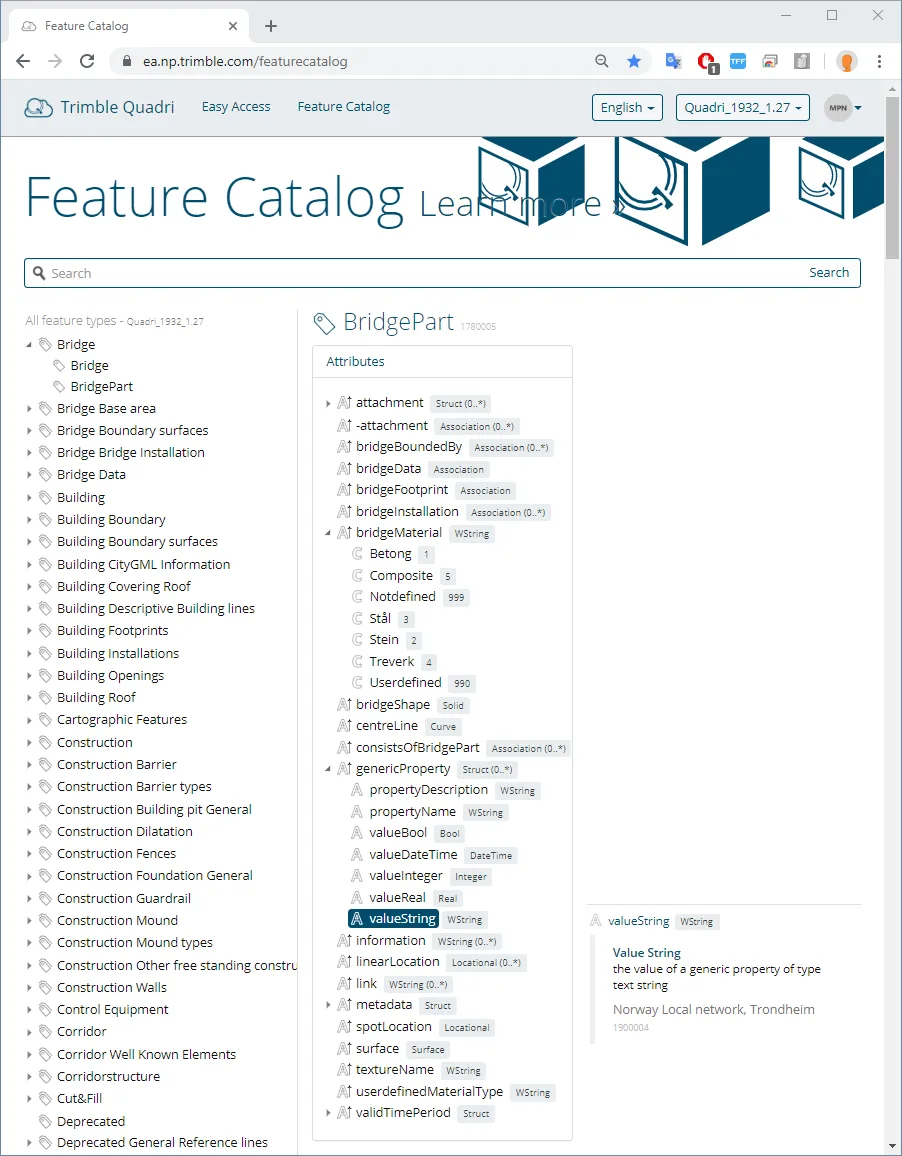
QuadriModel: Quadri is a native format used in a 3D visual model management program tailored for infrastructure. It has an object library similar to SOSI files. Each object (Level 0) has properties (Level 1) and may also include functions (Level 2). Its GenericProperty is equivalent to IFC’s PropertySetList, allowing storage of Level 3 information.
Information in IFC Files
Thanks to its structure, IFC files allow encoding of information at multiple levels. While IFC is often regarded as ideal for building structures, this is only partially true. IFC has also been successfully applied in infrastructure construction because it facilitates easy extraction of Level 2 and 3 information, while categorizing elements into object types like IfcSlab, IfcBeam, IfcWall, and others.
Several tools now exist to filter and visualize IFC file data. For example, in the E39 project, all professional models are delivered as IFC files. These are loaded into software that supports object-oriented visualization of multi-disciplinary models. The ISY Projekt tool manages storage and display of these multi-disciplinary models, enabling project browsing without needing drawing documents. It selectively displays only relevant information describing the model; for instance, clicking an object reveals only Level 2 and 3 data, hiding the underlying IFC file structure.
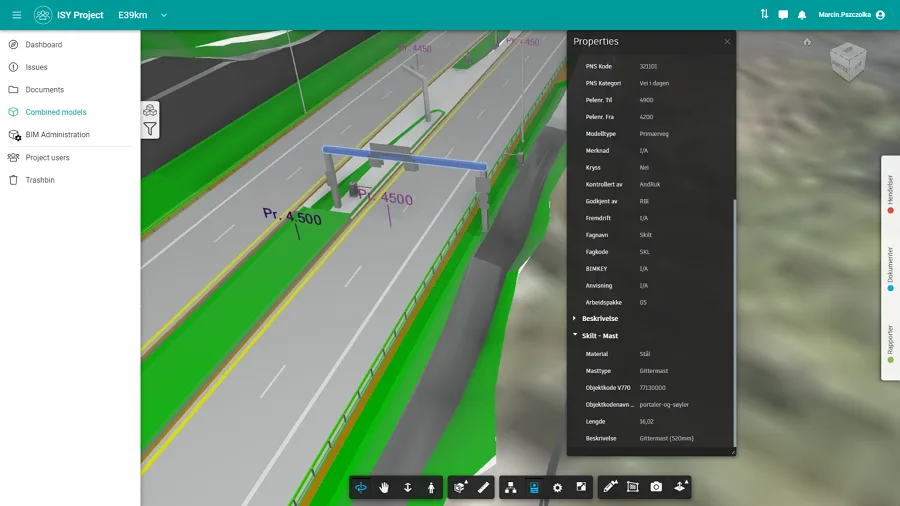
Examples of non-geometric information in an IFC file include data found in drawing document tables or parameters shown in construction detail drawings. This may cover:
- Layer volume (e.g., 200 m³)
- Length (e.g., 16 meters)
- Material type (e.g., C30 concrete)
- Layer name (e.g., frost protection layer)
- Designer (e.g., Maxin Pushzorka)
- Controller (e.g., Krzysztof Voislau)
- Material cost (e.g., 3 materials costing 300 PLN per 1 million)
- Status (e.g., MMI 300)
Which is the best BIM file format? IFC or DWG?
BimAnt translation and compilation. Please indicate the source when reprinting.
















Must log in before commenting!
Sign Up