
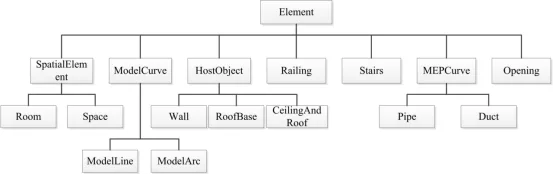
Elements play a vital role in Revit models, as most of the objects users interact with within the model interface are composed of elements. These include walls, families, family types, family instances, and various other instantiated objects. Additionally, certain software operations—such as moving, selecting, or rotating the model—also involve corresponding instantiated objects that can be selected. In Revit, components like walls, floors, roofs, columns, and annotations have corresponding classes, which typically inherit from the base Element class, as illustrated in Figure 1.
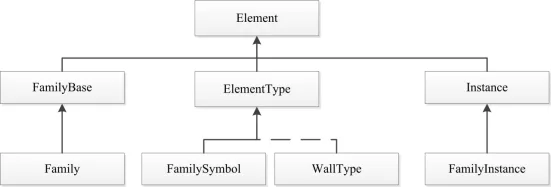
The family category shown in Figure 2 demonstrates the relationship between a family, family type, and family instance. Here, Family corresponds to the overall category, while Family Type (or FamilySymbol) represents specific variations within that family. For example, different types of walls, columns, and doors correspond to different family types. A Family Instance corresponds to an individual model object, such as a specific door or window. All these inherit from the Element class.
As an information-rich 3D visual model, a Revit model functions similarly to a database, storing extensive data. Each model element has a unique ID that enables full scene tracking and precise identification of needed components. Revit assigns class names to each model component, such as Rebar for steel reinforcement, WALL for walls, and DOOR for various door types. This classification makes it easy to identify materials for quantity takeoff or analysis.
The data associated with each element can be categorized into several types:
- Attribute Data: Includes properties such as name, material, material strength, manufacturer, and construction date—details relevant to elements like columns.
- Coordinate Data: Represents spatial positioning within a 3D coordinate system, for example, the X, Y, Z coordinates of a column’s center or key points.
- Geometric Data: Describes the spatial shape and dimensions, such as cross-sectional shape, dimensions, height of concrete columns, and the diameter and length of steel bars used.
This comprehensive information allows for precise calculations, such as determining the radius, length, and strength of steel bars, or the type, height, and area of walls. The Revit information model contains all the attribute data needed for components, including beam sizes, strengths, and lengths.
















Must log in before commenting!
Sign Up