
The core of Revit file sharing revolves around the central file, which is closely linked to the concept of Worksets. A Workset can be understood as a group of elements sharing the same attribute—a logical grouping of model components within a project file. Importantly, only one user can edit a Workset at a time. Typically, Worksets correspond to specific areas of responsibility, such as different architectural disciplines (exterior, framing, interior, ceiling, etc.) or physical features (main structure, wings, rental spaces, etc.). Designers can work independently within a Workset or update their work based on changes made by other team members. After completing their tasks, users return the Workset to the central file and relinquish control over it.
When multiple team members need to work on shared components within the same Workset, Revit’s dynamic editing feature facilitates collaboration. This feature, fully managed by the Revit system, allows multiple users to work simultaneously in the same Workset. For example, if a user intends to modify a component, Revit first checks if another user is currently editing it. If the component is “unoccupied,” Revit automatically assigns it to the user, preventing others from editing it. If the component is already assigned, Revit sends a message requesting permission to borrow it for modification. If granted, ownership transfers to the requesting user; if denied, the request is rejected, and the original user is notified. Worksets help prevent conflicting edits by limiting simultaneous changes, enabling multiple local files to operate concurrently. Dynamic editing further supports collaboration within a single Workset. Beyond these advantages, Worksets also assist with visibility control, model permissions, and other functions. However, if Workset settings are disorganized and overlapping tasks are frequent, team members will spend excessive time borrowing elements and requesting edits, significantly reducing efficiency.
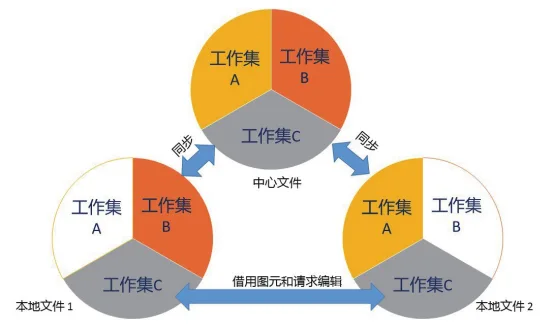
Determining the Workset configuration should be a collaborative decision made by project members before the project begins. The configuration depends on the project’s scale, with Workset divisions varying based on project type, phase, and the number of participants. Below are some fundamental principles to guide Workset division for reference.
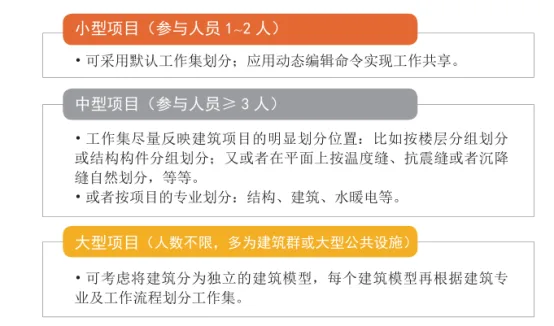
Once a Workset is created, any new project files will default to the central file upon their first save and will be stored in the appropriate server location for access by other project team members.
—Excerpt from BIM Design Software and Drawing – Drawing Practice Based on Revit by Li Yiyi
For learning and exchange purposes only. Copyright belongs to the author and publisher.
















Must log in before commenting!
Sign Up