
This article is from the WeChat official account: Tekla Technology Learning.

The interface of Tekla versions released after 2016 has undergone significant changes, which many users may find unfamiliar. In a previous article, we covered how to revert Tekla’s drawing property files to the old version display.
If you find that method too complicated, you can also download the ready-made plugins we’ve prepared. These plugins allow you to easily modify various commonly used advanced option tools.
Today, we will share how to restore the drawing output dialog box in the newer versions of Tekla to the classic old version interface.
First, let’s take a look at the output dialog box in the latest software version, which includes many additional settings.
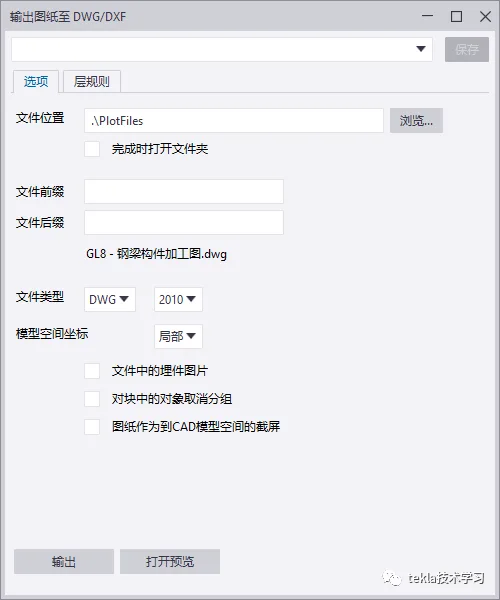
Instructions:
Using Tekla 2020 as an example, here is a detailed step-by-step guide to restore the old drawing output dialog box:
Step 1: Click the menu bar in the upper left corner and select Open Model Folder.
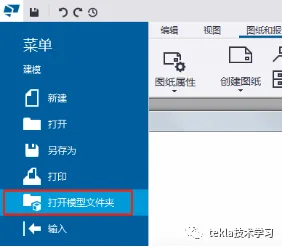
Step 2: Close the Tekla 2020 software.
Step 3: In the model folder opened in Step 1, locate the option.ini file. Right-click it and choose Open with Notepad. This file contains the model’s initialization and parameter settings.
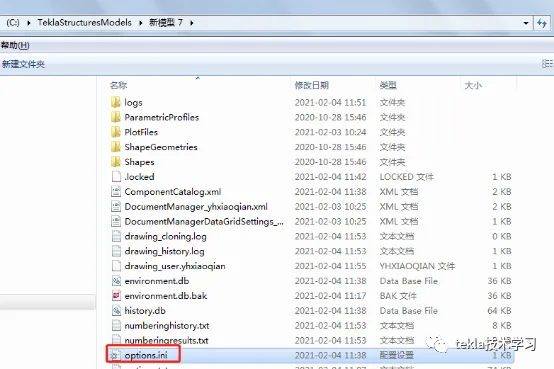
Step 4: Add the following line to the option.ini file:
XS_USE_OLD_DRAWING_EXPORT=TRUE
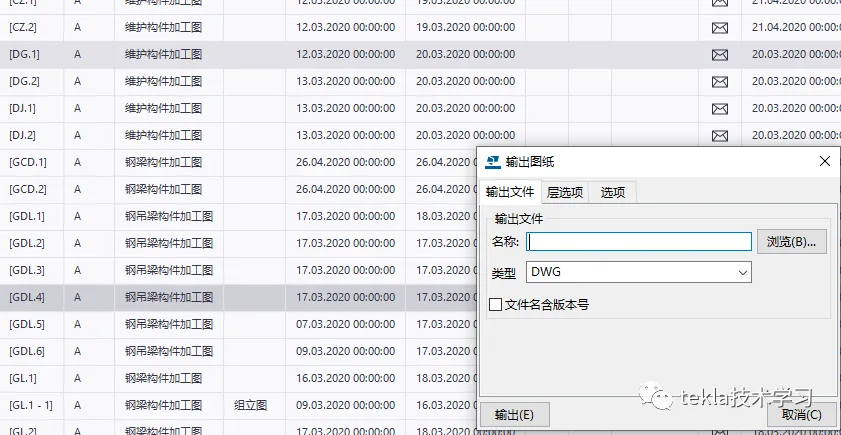
Step 5: Save and close the option.ini file. Then, restart Tekla 2020 and open the model you just modified. The drawing output dialog box will now appear in the old version style, as shown below.
















Must log in before commenting!
Sign Up