
(1) The interface is straightforward. SketchUp’s interface mainly consists of the basic toolbar, drawing toolbar, view toolbar, and default panel, covering almost all the functional needs of the software. This makes it easier and faster for users to learn and master the application.
(2) Broad applicability. Thanks to its advantages in design modeling, SketchUp is widely used not only in architectural design but also in urban planning, landscape design, interior design, and more. It has transformed design workflows across various fields from a software perspective.
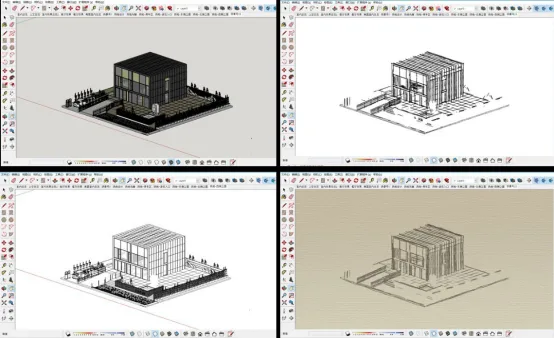
(3) Diverse presentation modes. SketchUp offers a variety of design style presentations and model display options, including sketches, line drawings, perspective views, and renderings (see Figure 1). This flexibility allows designers to express their ideas in multiple ways tailored to specific design needs.
(4) Software interoperability. SketchUp supports converting between 2D and 3D data formats and integrates smoothly with other design software such as AutoCAD, Revit, and ArchiGIS, unlocking enhanced design capabilities. It can quickly export and import 2D graphic formats like DWG, DXF, EPS, JPG, as well as 3D model formats such as IFC, KZM, and 3DS. This seamless workflow connection reduces redundant modeling efforts during architectural scheme and construction drawing design.
(5) Simple 3D modeling. Creating 3D models in SketchUp is both fast and intuitive. Users start by drawing a plane, then use the push-pull tool to transform it into a 3D shape—without complex parameter settings. This process aligns naturally with designers’ thought processes when working with 3D forms.
(6) Interactive features. SketchUp includes animation scenes and camera walkthrough tools that enable users to easily create design demonstration animations. This capability allows for a comprehensive presentation of 2D graphics, 3D models, and animations, enhancing the interactivity of design proposals and effectively conveying architects’ ideas.
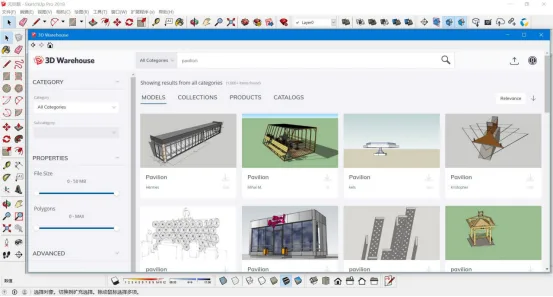
(7) Extensive design resources. As illustrated in Figure 2, SketchUp’s 3DWarehouse is a large online library offering a wide range of 3D models including building components, furniture, landscaping plants, mechanical equipment, and infrastructure. Designers can quickly search, download, and apply these models in bulk to their projects.
















Must log in before commenting!
Sign Up