
SketchUp is a leading 3D modeling software widely adopted in the urban and rural construction design industry. Its popularity stems from its user-friendly interface, easy learning curve, and powerful features. Particularly during the early stages of architectural design, SketchUp excels as it directly supports the design process. Creating 3D models is straightforward and fast: designers simply draw lines to form a plane and then push or pull to generate a 3D shape. This intuitive modeling method remains the simplest and most favored approach among designers today.
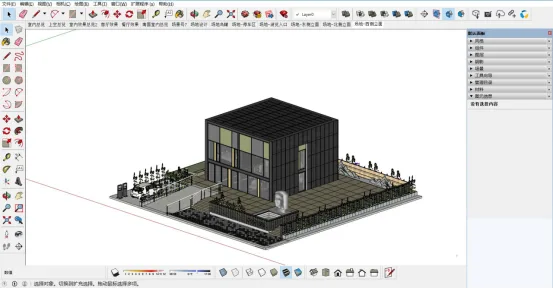
Figure 1: SketchUp software interface and modeling example
Beyond basic modeling, SketchUp combines the natural feel of pencil sketching with the flexibility of hand-drawn illustrations. It also incorporates features such as material libraries, lighting and shadow tools, and dynamic 3D model visualization. This integration allows architects to blend actual design concepts with multimedia elements, enabling creative expression like the Tianma Xingkong design concept shown in Figure 1. Using SketchUp, architects can quickly and intuitively provide real-time feedback on their designs, facilitating efficient visual communication throughout the conceptual phase.
Thanks to its simple modeling and editing workflows, SketchUp minimizes the time and effort spent on software operation, allowing designers to focus on the creative aspects of their work.
While specialized BIM software like Revit and ArchiCAD are widely used, their complexity and longer learning curves can slow down early design stages. As a result, SketchUp remains the preferred choice for architects during the scheme design phase, offering speed and ease without compromising on creative flexibility.
















Must log in before commenting!
Sign Up