
SketchUp is user-friendly and features push-pull modeling, which makes creating models fast, efficient, and less labor-intensive. This software has become essential for architects during the conceptual and refinement stages of architectural design. However, the 3D models created in SketchUp primarily consist of geometric shapes without detailed building components or relevant design information. This limitation, along with poor interoperability with other BIM software, has hindered SketchUp from becoming a mainstream BIM platform. Despite these challenges, SketchUp’s strengths in schematic design, modeling speed, and its open, free platform offer significant potential for BIM integration. With BIM technology’s growing importance and irreversible development trend, enhancing SketchUp’s BIM capabilities and integrating them seamlessly into architectural workflows has become a key industry focus.
Dynamic Parameterized Components
Since version 7, SketchUp has introduced Dynamic Components, a feature similar to Revit’s family system, designed to address limitations in parametric modeling. Over recent years, continuous software updates have significantly enhanced the power of these dynamic components, making parametric modeling in SketchUp comparable to mainstream parametric tools.
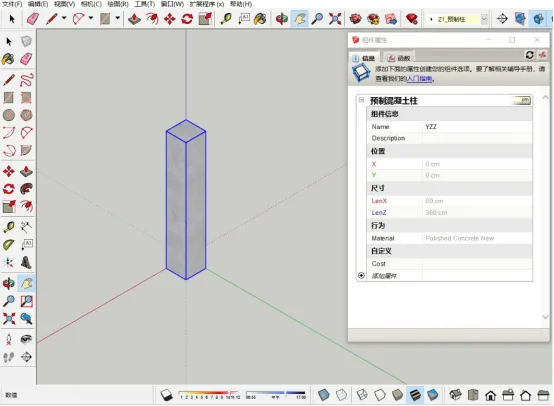
Dynamic Components allow SketchUp models to carry attribute data beyond simple geometry, defining components as basic units with embedded information. As illustrated in Figure 1, designers can create dynamic, parameter-driven components such as columns, stairs, doors, windows, and railings by setting parameters or editing functional relationships according to project needs. When design changes occur, adjusting parameter values automatically updates the components, greatly improving design efficiency.
Furthermore, these components include property dialogs where users can assign metadata such as component type, quantity, manufacturer, and price. This information is linked to the 3D model and can be modified, transferred, or exported alongside the model during project development.
Interoperability with IFC Standards
The IFC (Industry Foundation Classes) standard, proposed by BuildingsMART, is an open, object-oriented neutral format designed to enable data exchange across software platforms in the construction industry. Its primary goal is to overcome information silos between different BIM tools, facilitating seamless data sharing throughout a building’s lifecycle. Over the decades, the IFC standard has evolved rapidly, from IFC1.0 to the current IFC2x4, improving the scope, accuracy, and efficiency of data exchange. Today, IFC is the central format for BIM information interoperability.
SketchUp supports IFC import and export to meet project data exchange requirements. Using the IFC2x3 file format, SketchUp can export models with classification data to share design information with other BIM software. This capability addresses prior limitations related to SketchUp’s proprietary file formats, improving its software interoperability and enabling integration into BIM workflows.
Classifier Tool
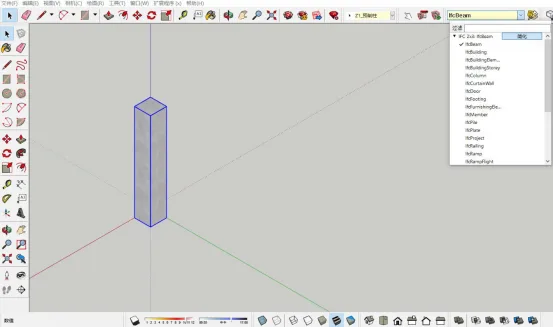
Unlike professional BIM software like Revit, which predefines IFC data types for components to streamline classification and export, SketchUp introduced the BIM Classifier tool in SketchUp 2014 Pro (see Figure 2) to fill this gap. Using this tool, designers can categorize components as IfcBeam, IfcColumn, IfcDoor, and more, allowing all relevant information—such as dimensions, type, material, price, and manufacturer—to be encoded into the IFC standard data format.
When exporting, SketchUp generates IFC files that precisely represent the component models according to their classification, including all metadata set during design. This enhances accuracy and interoperability of BIM data exchange.
Trimble Connect Collaborative Platform
A core objective of BIM software is to enable multidisciplinary teams in construction projects to collaborate efficiently, improving communication, reducing errors, and ensuring design consistency. Trimble Connect is a cloud-based collaboration platform that supports architects, structural engineers, contractors, and owners by allowing them to share, view, and access the latest project data anytime and anywhere via web, mobile, or desktop devices (see Figure 3).
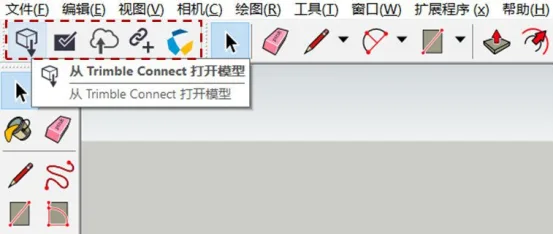
Integrated into SketchUp’s extension ecosystem, Trimble Connect offers functionalities such as model upload, download, and collaboration management. Designers can upload their models from anywhere and access the latest designs shared by team members, enabling real-time collaboration. This streamlines parallel workflows, supports multidisciplinary coordination, and addresses common issues in traditional design processes such as slow communication and information gaps, ultimately enhancing project synergy and reducing rework.
















Must log in before commenting!
Sign Up