
Shared parameters are defined in a separate shared parameter file (.txt) located outside of Revit. Deleting this file will cause the loss of all shared parameters. Therefore, when setting up template files, the goal is to generate a .txt file containing shared parameter definitions as part of the template. This allows these parameters to be reused in future project and family files. Shared parameters can be added to or marked within the project parameters table. It is important that a project uses only one shared parameter file, as having multiple files can cause irregular parameter displays in both project and family files.
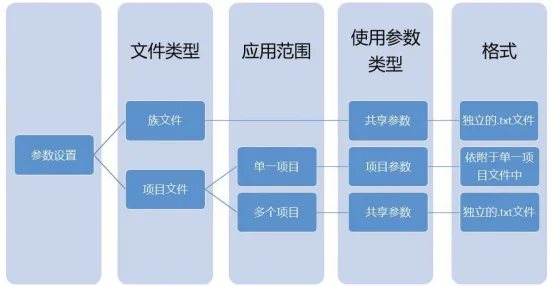
The key difference between project parameters and shared parameters lies in their scope and storage. Project parameters are specific to a single project file and cannot be shared across multiple projects. In contrast, shared parameters can be used across multiple projects and family files simultaneously. Project parameters are stored within the project file itself, while shared parameters are stored externally in a separate .txt file, not within the project or family files.
In terms of application, shared parameters are essential when working with importable families that require consistent parameter settings. For parameters strictly related to a project, either project parameters or shared parameters can be used. Adding shared parameter definitions to a family or project allows them to function as family or project parameters. Essentially, shared parameters have a broader scope and offer more functionality than project parameters. Every function achievable with project parameters can also be accomplished with shared parameters, whereas annotation and detailed reporting of family parameters require shared parameters and cannot be done with project parameters alone.
When deciding which parameter type to use, consider two factors: whether the parameter is intended for a family file or a project file, and the scope of its use. If you need to define new family parameters that require annotation and detailed schedules within the project, shared parameters must be used. For parameters that can be defined solely within the project file, consider whether they need to be used across multiple projects or just one. For single-project use, project parameters are sufficient. However, if the parameter settings need to be universal and applied across multiple projects, shared parameters are the better choice.
Source: “BIM Design Software and Drawing – Drawing Practice Based on Revit” by Li Yiyi
For educational and communication purposes only. Copyright belongs to the original author and publisher. If there is any infringement, please contact us for removal.
















Must log in before commenting!
Sign Up