
In Revit, every component used to build a model is based on a concept called a family, which is fundamental to the software. Walls, windows, doors, water pipes, air ducts, and various equipment are all categorized into different families. Each family type includes both instance parameters and type parameters. When you modify instance parameters, only the selected objects are affected. However, changing type parameters updates all components of that family type within the model. Revit provides numerous built-in families for users, and the family editor allows the creation of new family types to accommodate specific design requirements.
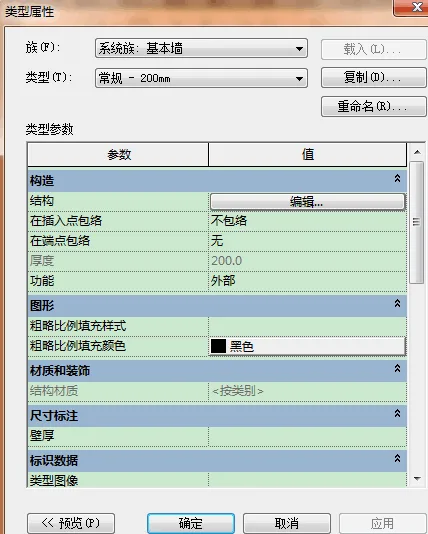
Families in Revit are categorized by their origin into two types: system families and loadable families. System families are built-in and their parameter information is stored within project templates. Utilizing a well-designed project template can significantly boost design efficiency, effectively doubling productivity. Users cannot load, create, copy, or delete system families directly. However, they can duplicate and modify the types within system families to suit project-specific needs and create new system family types. On the other hand, loadable families can be defined and created by users using the “New Family” function or imported from families created by other designers or agencies.
Revit families can also be divided based on their dependency: independent families, such as walls and floors, which can be placed freely within a project; and dependent family components like doors and windows, which must be attached to a host element and cannot exist independently in the model. Designers have the option to create new family types by developing family template files derived from these main elements.
Each family component in Revit requires a set of defined parameters. These general parameters are managed and adjusted through the “Type Properties” dialog box, where users can also create new family types by duplicating existing ones. For example, as shown in the image, a new family type named Basic Wall – General – 250mm can be created by copying and modifying the parameters of the Basic Wall – General – 200mm type from the system family.
















Must log in before commenting!
Sign Up