
Traditional methods of engineering measurement and pricing during bidding often lead to significant inaccuracies. By integrating BIM into the preparation of bidding control prices, the information embedded within the model can be fully utilized, enhancing work efficiency and providing valuable data support for subsequent tasks.
Using BIM for collision detection, design optimization, and detailed development results in a more comprehensive design scheme. Owners can then prepare a bill of quantities based on the refined design drawings and BIM models during the bidding process. Typically, calculating bidding quantities and control prices with BIM involves the following steps (illustrated in the image below).
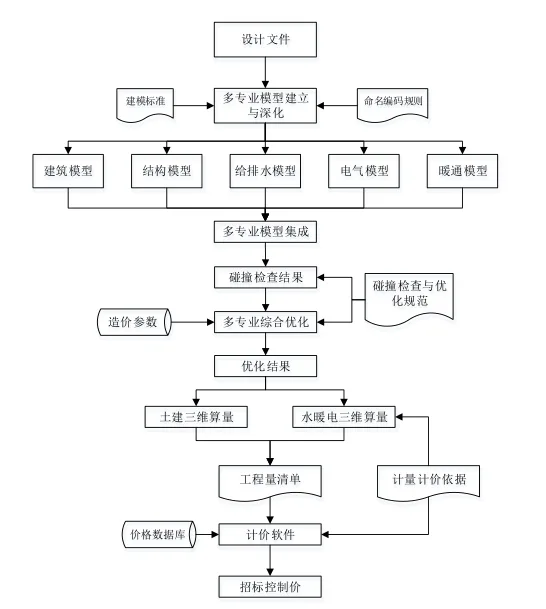
More specifically, the process includes the following key points:
① Model Construction: The first step in applying BIM technology for bidding quantity calculation is to build a detailed BIM model. It is essential to ensure that each component’s geometric and attribute information is complete to facilitate accurate quantity calculations. The design documents should be optimized and gradually refined according to the owner’s requirements, establishing a clearer basis for measurement and pricing. Additionally, to maintain data integrity when importing BIM models into BIM5D systems, components must be named and organized according to specific modeling standards.
② Data Parameter Addition: Necessary data parameters, such as decorative materials and concrete strength grades, should be embedded within the model. This information serves as a valuable reference for subsequent construction phases.
③ Component Differentiation: Construction methods vary across different engineering components, with some allowing for automatic application of quotas while others do not. Therefore, when building BIM models, it is important to categorize components based on applicable quota regulations and project-specific practices. “Automatic nesting” refers to calculating quantities of components directly specified in the quota or list, enabling BIM software to automatically compute quantities and related accessories. Components that do not support this require manual handling.
④ Pricing: Pricing is conducted within BIM pricing software, based on the various parts of the bidding control price.
















Must log in before commenting!
Sign Up