
Choosing the right BIM software system is a crucial step in implementing BIM technology. The hardware environment supporting an enterprise’s BIM application typically includes server-side equipment such as desktops and laptops, mobile devices like tablets, mobile servers, network systems, and storage solutions. Early-stage investments in this hardware environment tend to be significant, greatly influencing overall efficiency during later project phases.
When building a BIM hardware infrastructure, it’s important to balance the hardware resource demands of current BIM projects with future development trends and actual project needs. Avoiding both excessive high-end configurations and overly conservative setups helps prevent wasted resources from over-investment and performance bottlenecks caused by under-investment.
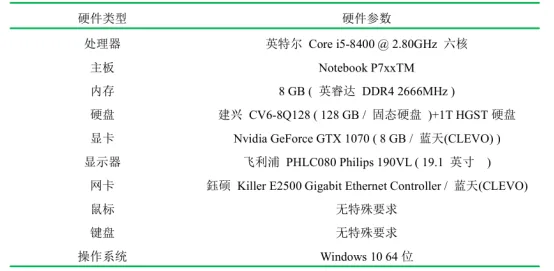
BIM technology places high performance demands on personal laptops used by enterprises, including aspects such as data processing power, graphical rendering capabilities, and information management efficiency. Hardware requirements can vary based on the selected BIM software and the responsibilities of construction team members. This enables organizations to make cost-effective investments in their infrastructure.
A typical BIM hardware configuration is categorized into client devices (desktops, laptops, handheld mobile terminals), servers, gateways, and storage, tailored to the working environment. Since a substantial portion of information resources is invested during the early phases of BIM deployment, these investments significantly affect the project’s overall quality and execution.
Therefore, companies should carefully evaluate the scale of their IT development and the hardware needs specific to BIM applications. Once the BIM software system is finalized, it’s essential to review existing hardware allocations and organizational structures, then plan and establish an IT infrastructure that supports BIM requirements. This process includes reconfiguring enterprise hardware resources to align with BIM technology.
Considering the project’s characteristics and the BIM team’s capabilities, there are numerous BIM software options, each with its own hardware requirements. To meet basic BIM modeling needs, the computer configurations recommended for the project’s BIM team can be referenced in the figure above.
















Must log in before commenting!
Sign Up