
Revit, developed by Autodesk, is one of the most widely used BIM (Building Information Modeling) software in China’s construction industry. It assists architects in designing, constructing, and maintaining building models with improved quality and enhanced energy efficiency. As a leading BIM tool, Revit’s strength lies in its robust support and high efficiency, making it a popular choice for modeling tasks.
Classification of Graphic Elements
In Revit, an element is a fundamental unit, representing various building components. Revit manages and coordinates these elements through their interrelationships, enabling efficient parameter-driven visualization according to project requirements. Elements can be categorized effectively based on their categories, families, and types. The main classifications are as follows:
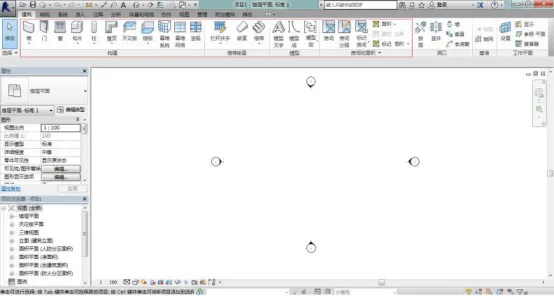
Figure 1: Various graphic elements in the Revit user interface
The red lines in the image above highlight components such as walls, doors, and windows, which are all categorized as building class elements. These elements can be further divided as follows:
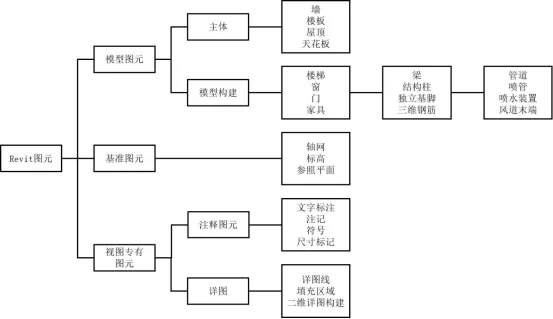
Figure 2: Classification of Graphic Elements
Graphic elements in Revit generally fall into three categories: model graphic elements, benchmark graphic elements, and view-specific graphic elements. Below is a detailed description of each classification:
(1) Main Graphic Elements
Main elements include walls, roofs, sites, and similar components. These are preset system elements and serve as the fundamental building blocks in Revit. Users cannot directly customize their appearance or parameters beyond the basic system settings. For example, the parameter composition of a basic roof is fixed, with only material parameters modifiable during application, as shown below:
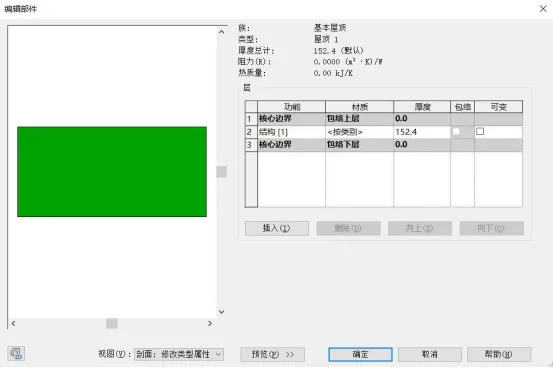
Figure 3: Parameter Design of a Main Element
(2) Component Elements
Component elements consist of items such as fittings, ducts, and electrical equipment. These elements are more flexible than main elements and allow users to modify parameters to tailor them to specific design requirements. For example, windows and doors are component elements typically added later in the construction process and must be attached to corresponding main elements such as walls. If a main element is deleted, its attached component elements will also be removed. For instance, deleting a wall will automatically delete its associated doors and windows. The figure below illustrates the type attributes of a window component, with modifiable material and size parameters:
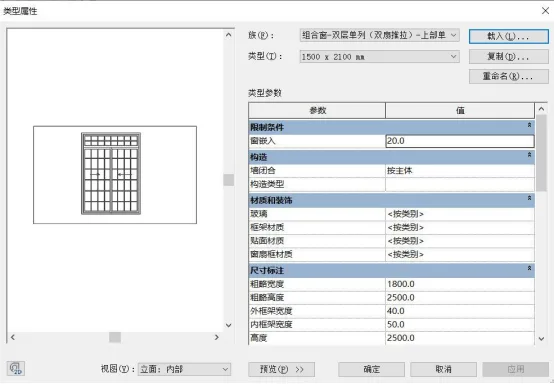
Figure 4: Attribute Classes of Component Element Windows
(3) Benchmark Graphic Elements
Benchmark elements include elevations, grids, and reference planes. Since Revit is a 3D modeling software widely used in design, setting work plane references is crucial. Benchmark elements act as reference planes during the design process, ensuring the model meets standards. Elevation grids constrain the vertical and horizontal planes of the 3D model, while reference planes serve as auxiliary lines for positioning. Additionally, to maintain modeling accuracy in line with surveying standards, reference surfaces and auxiliary lines are essential for benchmark referencing.
(4) Annotation Graphic Elements
Annotation elements consist of dimensions, tags, and text annotations. These are 2D view-specific components used to document models and maintain scale consistency on drawings. Users can customize the style of annotation elements, including tags and symbols, to suit localized design needs. There is a dynamic link between annotation and model elements: modifying the size or material parameters of a main element automatically updates the corresponding annotation dimensions. This “one change, all update” characteristic significantly boosts BIM modeling efficiency and distinguishes BIM software from traditional 3D modeling tools.

Figure 5: Annotation Graphic Interface
(5) View Elements
Since 3D modeling inherently involves multiple perspectives, collaboration between different views is vital during the modeling process. Revit’s view elements include 3D views, section views, elevation views, floor plans, and area plans, each operating independently. By configuring object styles, users can uniformly control object display, visibility of view components, and level of detail for each view, offering great adaptability. Together, these five element categories form the foundation of Revit’s BIM environment, enabling comprehensive building modeling capabilities.
















Must log in before commenting!
Sign Up