
In highway design, when the curve radius is smaller than the minimum radius allowed without widening, it becomes necessary to widen the road edge (offset line) at that location to accommodate vehicle turning requirements.
Similarly, in urban road design, level intersections often require widening and channeling of entrance and exit lanes near the intersection. This allows vehicles from all directions to move smoothly and improves overall traffic efficiency.
In Civil 3D, an offset route is created based on the road’s centerline and remains dynamically linked to it. Multiple offset routes can be generated for a single centerline, corresponding to different edges of the road components defined in the standard cross-section. Using the offset route command, designers can efficiently handle road edge designs such as inner curve widening, adding passing lanes on low-grade narrow highways, placing bus stops on urban roads, and widening intersections.
To create an offset route, click the Create Offset Route command under the Common Commands tab within the Route Command panel. Select the desired road centerline, specify the offset width for the typical section, and complete the creation of the offset route.
There are two methods to create widening for offset routes: customizing a widening standard file or manually specifying the widening segments. Each method suits different design scenarios.
For automatic widening of the inner side of horizontal curves, locate the built-in widening standard file in the software installation directory. Customize this standard according to local regulations and requirements, then load it into the widening standards. The offset route created afterward will comply with domestic design standards, as illustrated in Figure 1.
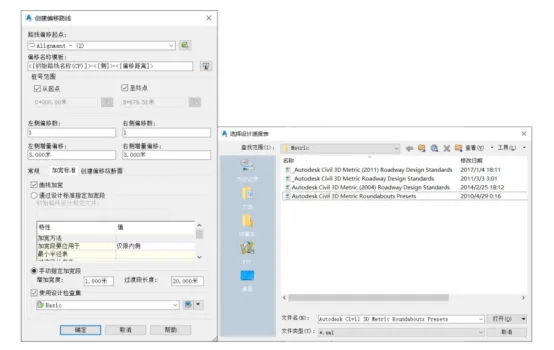
Figure 1: Creating an offset route with a widening standard
Custom specifications can also be adjusted through the Design Specification Editor found under the Modify tab, as shown in Figure 2.
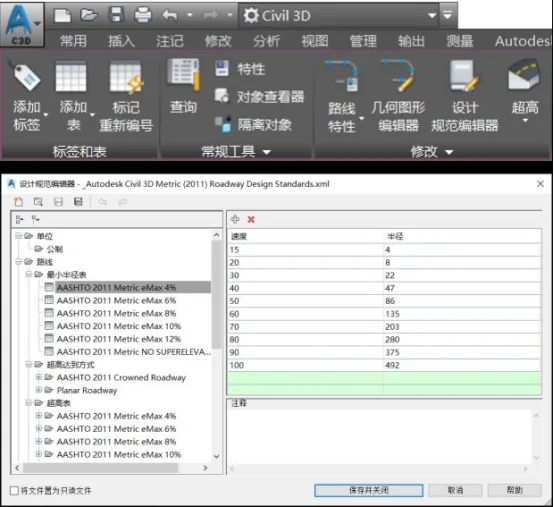
Figure 2: Design Specification Editor
For special sections such as bus stops or passing lanes, although there are relevant standards in the specifications, the design solutions are not unique, unlike the inner curve widening. Designers need to manually add widening segments based on the actual situation.
First, create an offset route for the entire alignment based on the lane allocation width from the standard cross-section. Then, select the offset route that requires widening, right-click, and choose to add a widened area. When prompted, select No to adding the widened area as a new route. Specify the starting and ending station numbers, enter the widening offset width, and in the offset route parameter dialog, you can view the detailed widening settings as shown in Figure 3.
A negative value in the offset parameter indicates widening on the left side of the route, while a positive value indicates widening on the right side. The panoramic dialog also allows detailed adjustments for the widening segment, grade segment, and transition mode.
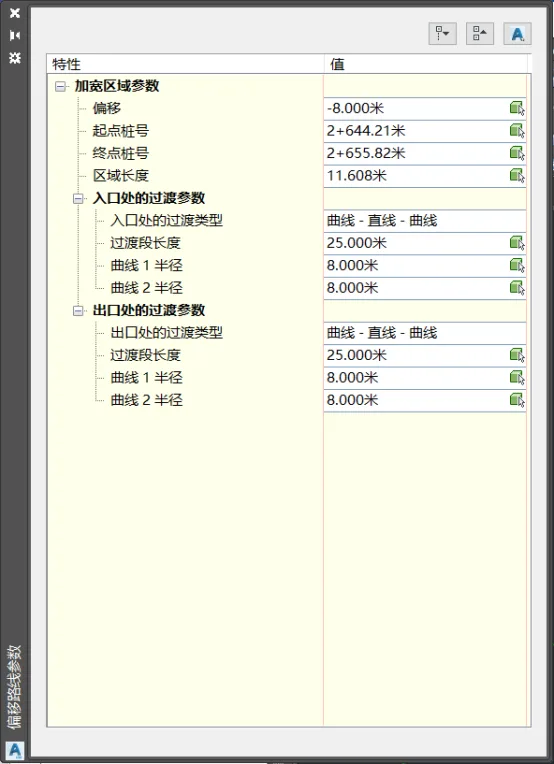
Figure 3: Offset Route Parameter Settings
Yang Long (Jilin University of Architecture)
For learning and communication purposes only. Copyright belongs to the original author. If there is any infringement, please contact us for removal.
















Must log in before commenting!
Sign Up