
To begin, click on the Toolspace tab to navigate to the directory, then expand Slope Grading – Slope Grading Standards Set, as illustrated in Figure 1.
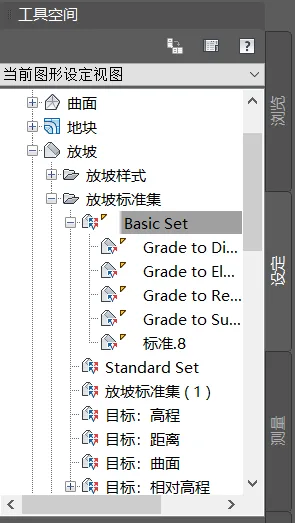
Figure 1: Toolspace tab directory settings
Next, select one of the existing grading standards, right-click it, and choose to create a custom grading standard, as shown in Figure 2.
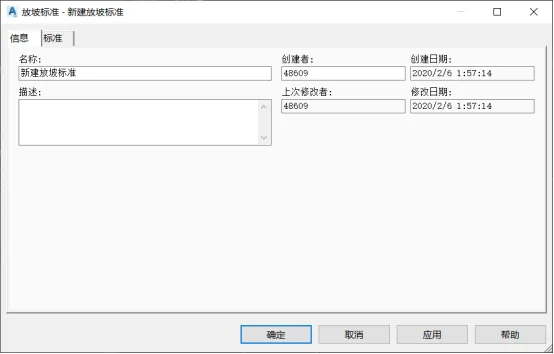
Figure 2: Creating a New Grading Standard
Once the dialog box expands, configure the grading standard settings including slope method, slope projection, and conflict resolution options.
The slope method defines the target object for grading, which can be set to surface, elevation, relative elevation, or distance.
The slope projection sets the default slope gradient or slope rate.
The conflict resolution addresses how to handle internal corner overlaps, offering three methods: averaging the slope, maintaining the minimum slope, or maintaining the maximum slope. See Figure 3 for reference.
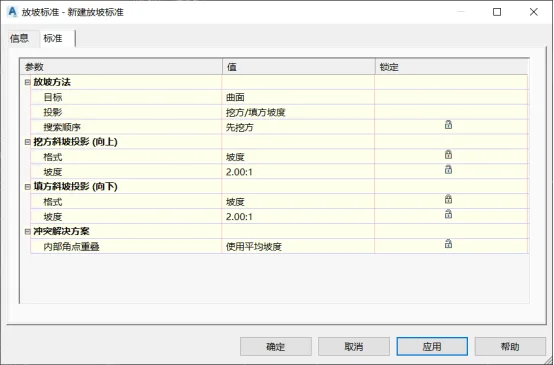
Figure 3: Grading Standards Configuration
Finally, sloping objects within the same grading group can be combined to create a grading group surface. This allows for accurate calculation of excavation and fill volumes.
















Must log in before commenting!
Sign Up