
This article is from the official account: FLBIM.
When working with ARCHICAD, you may encounter situations where irregular columns cannot be created using the standard column tool. After some experimentation, we recommend two effective methods to model these columns. Below, an example is provided to illustrate the process.
Sample of Irregular CAD Column
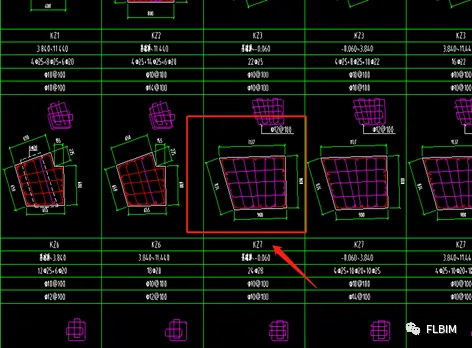
Method 1: Complex Section Manager
Using ARCHICAD’s Complex Profile Tool
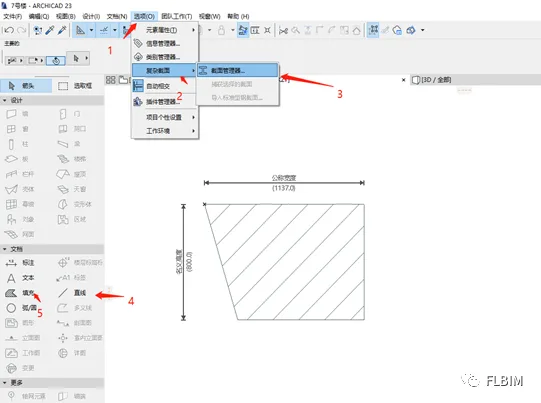
Follow these steps to create an irregular column using the complex section manager:
- Open the options menu.
- Select the Complex Profile option.
- Access the Section Manager.
- Use the Line command to draw the dimensions based on the CAD drawing.
- Apply the Fill command to define the material and assign the concrete strength.
Method 2: Using the Slab Tool
Freehand Drawing with the Slab Tool
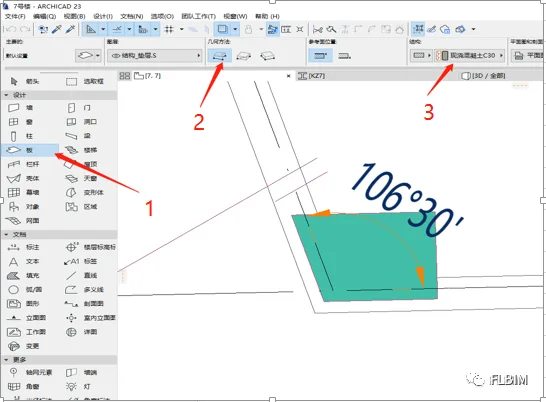
To model an irregular column with the slab tool, follow these steps:
- Select the Slab tool.
- Choose the freehand drawing mode.
- Enter the concrete strength.
- Set the slab thickness to match the floor height.
- Complete the irregular column drawing.
Conclusion: Between these two methods, using the slab tool (Method 2) is simpler, faster, and does not affect the calculation of concrete quantities based on composition.

xuebim
Follow the latest BIM developments in the architecture industry, explore innovative building technologies, and discover cutting-edge industry insights.
← Scan with WeChat















Must log in before commenting!
Sign Up