
This article is from the official account: BIM Center of Guangdong Heavy Industry Institute.
Today, I want to share a handy tip about an auxiliary drawing tool that can help you work faster. Make sure to read carefully!
Today’s Tip: Auxiliary Drawing Tools
Default shortcut key: None (you can customize it yourself)
To find the auxiliary drawing tool, go to the menu bar and select Window > Tool Bar > Auxiliary Drawing Tool.
First, open ARCHICAD and display the auxiliary drawing tool menu bar.
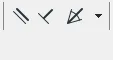
(The icons for parallel control, vertical control, and angle bisector control are shown in the image above.)
Let’s explore these three controls in detail:
1. Parallel Control
If you want to draw a beam parallel to an existing beam, first select the beam tool. Then activate the parallel control option, click on the beam you want to be parallel to, and draw your new beam. This ensures the new beam stays parallel to the selected one.
2. Vertical Control
To draw a beam perpendicular to an existing beam, select the beam tool, enable the vertical control option, select the beam you want to be perpendicular to, and then draw the new beam. This method guarantees that the new beam remains perpendicular.
3. Angle Bisector Control
When two beams form an angle and you want to draw a beam along the angle bisector, select the beam tool, activate the angle bisector control, then select the two beams that create the angle. A small black dot will appear on the bisector. When you draw the beam, one end will snap to this bisector, while the other end can be placed anywhere along the angle.
These auxiliary drawing tools also work well with wall tools and other elements. They are simple but powerful — give them a try!
















Must log in before commenting!
Sign Up