
Revit is a 3D design software widely used in the construction industry. Acquired by Autodesk in 2002, it has since become a key tool for 3D modeling under Autodesk’s portfolio. The software is divided into three main modules: Revit Architecture, Revit Structure, and Revit MEP, which correspond respectively to architectural design, structural engineering, and mechanical, electrical, and plumbing engineering.
At its core, Revit operates as a comprehensive database containing various interconnected building information. Any modification made to components in the 3D model view automatically updates all other views in real time. This dynamic synchronization ensures data integrity throughout the project, significantly enhancing both design efficiency and quality while enabling effective building information management.
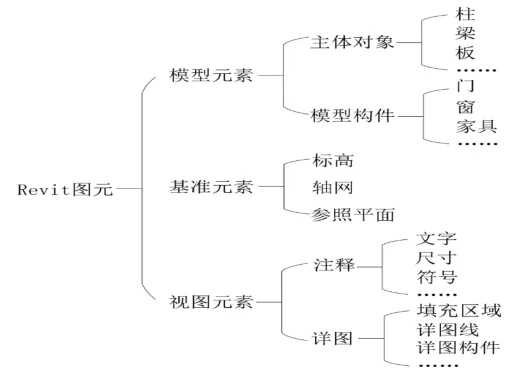
When working with Autodesk Revit, it is essential to understand some fundamental professional terms, such as elements, families, family categories, family types, and family instances.
Revit elements are categorized into three groups: model elements, reference elements, and view elements, as illustrated in the image above. Model elements are the primary building blocks within Revit. They include independent objects like columns, beams, slabs, and walls, as well as components that must attach to main objects, such as doors and windows. Reference elements serve mainly as guides to help locate model elements; typical examples include elevations and grids. View elements consist of annotation and detail elements—common annotation elements are text and dimension tags, while detail elements include detail lines and components.
Families in Revit are collections of elements within a category that share common parameters (properties), functions, and graphical representations. Families fall into three types: system families, loadable families, and in-place (built-in) families.
System families are predefined in the software; they can be modified and duplicated but not newly created. Typical system families include basic building components like columns, beams, slabs, walls, doors, and windows. Loadable families are created using various family templates and can be imported into multiple projects or saved in local libraries for reuse. In-place (built-in) families are unique to the current project file and cannot be used externally.
A family category groups components based on shared characteristics. A family type defines specific variations within a family, such as different sizes of a concrete rectangular column family. Finally, a family instance refers to an individual component placed within a project, like a specific column instance.
















Must log in before commenting!
Sign Up