BIM World
A Professional BIM Learning Platform


BIM Q&A | Bentley Software Tutorial: Adding Station Number Annotations to Plane Lines According to Chinese Standards

Source: Fancheng BIM

Have you ever noticed that when drawing plane lines with ord, there are no annotations added automatically? This can make it difficult to spot errors. Today, I will show you how to add plane annotations effectively. By comparing the station number annotations with the design drawings, you can verify if your drawings are accurate.

Here are the steps:

1. The software used is CNCCBIM, which comes with built-in domestic annotation styles. You only need to create a template.

BIM Q&A | Bentley Software Tutorial: How does CNCCBIM add station number annotations that conform to Chinese customs to plane lines?

2. Create a new project and select the workspace as shown in the image below.
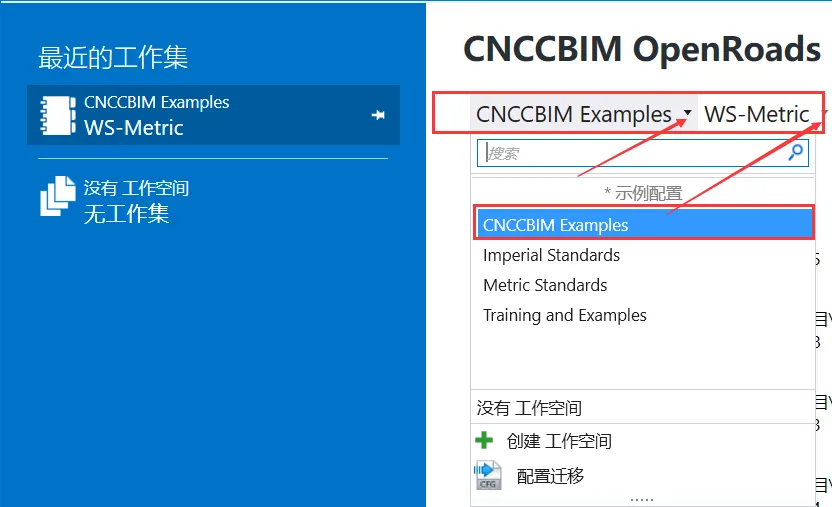
BIM Q&A | Bentley Software Tutorial: How does CNCCBIM add station number annotations that conform to Chinese customs to plane lines?

3. When drawing planar line types, make sure to use the feature definition “CC-MR”. Without this, annotations will not be generated.
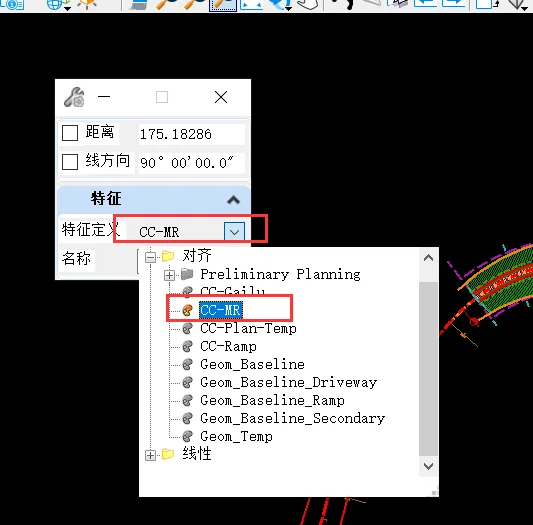
BIM Q&A | Bentley Software Tutorial: How does CNCCBIM add station number annotations that conform to Chinese customs to plane lines?

4. After drawing the plane line, switch to the CNCCBIM workspace. There, you’ll find a “Route” tab where you can configure route annotations.
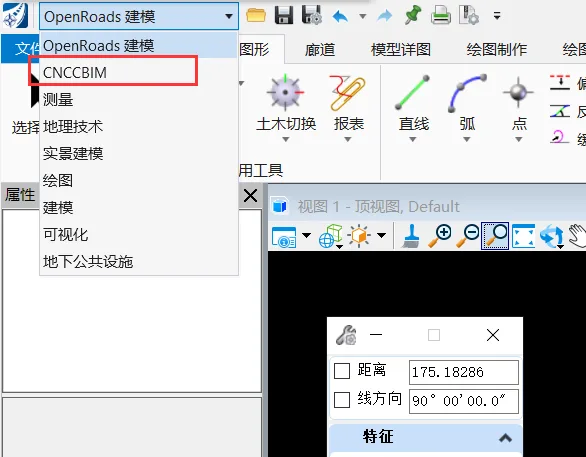
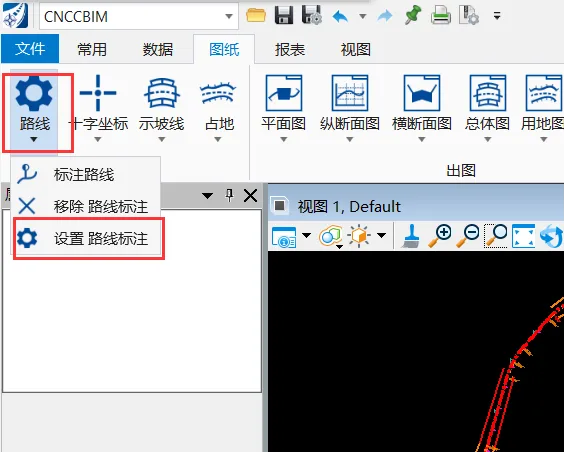
BIM Q&A | Bentley Software Tutorial: How does CNCCBIM add station number annotations that conform to Chinese customs to plane lines?BIM Q&A | Bentley Software Tutorial: How does CNCCBIM add station number annotations that conform to Chinese customs to plane lines?

5. Set the station numbers you want to annotate within the plan annotation settings.
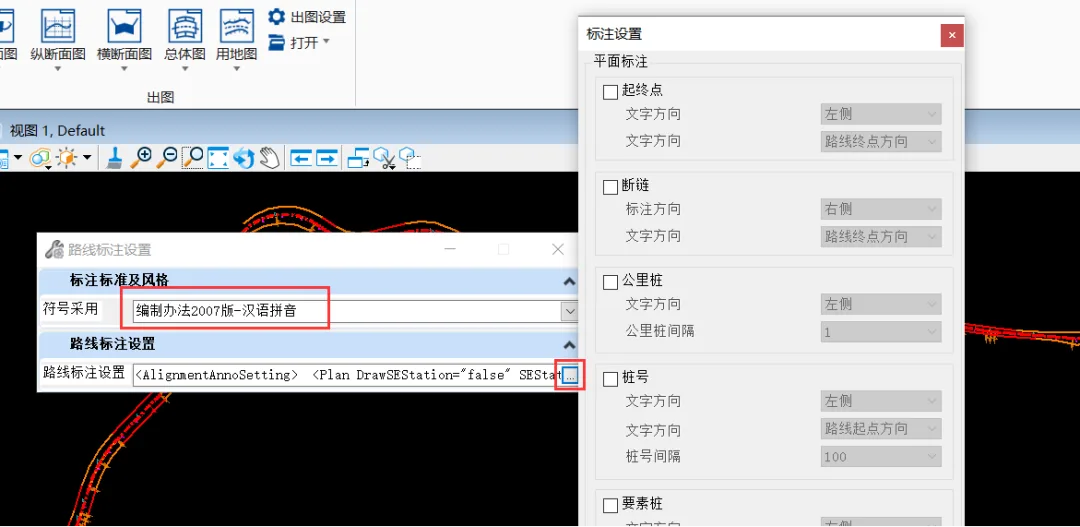
BIM Q&A | Bentley Software Tutorial: How does CNCCBIM add station number annotations that conform to Chinese customs to plane lines?

6. Finally, click on ‘Label Route’ and select the plane line. The software will automatically generate station numbers that comply with domestic Chinese standards.
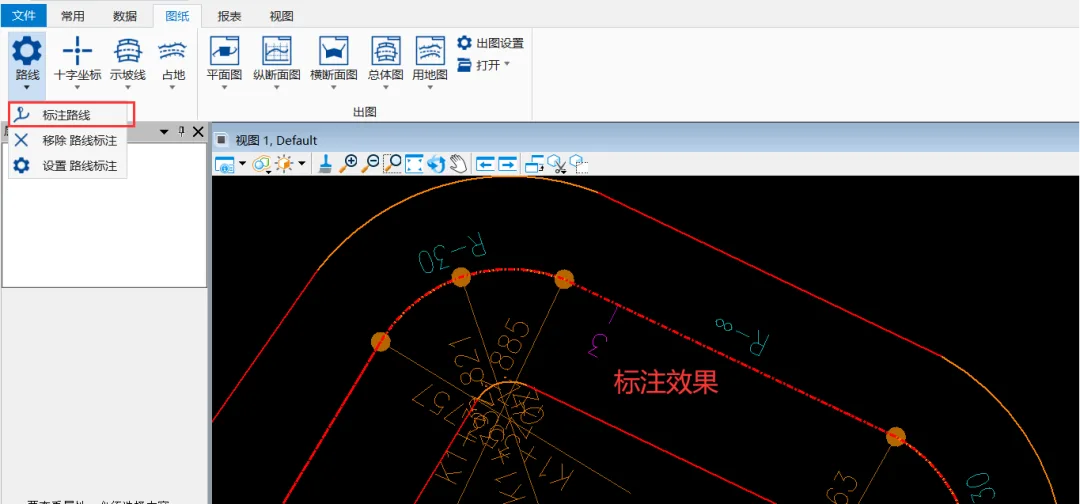

BIM Q&A | Bentley Software Tutorial: How does CNCCBIM add station number annotations that conform to Chinese customs to plane lines?

xuebim
Follow the latest BIM developments in the architecture industry, explore innovative building technologies, and discover cutting-edge industry insights.
← Scan with WeChat
Like(0) 打赏
BIM WORLD » BIM Q&A | Bentley Software Tutorial: Adding Station Number Annotations to Plane Lines According to Chinese Standards

Comment Get first!

Must log in before commenting!


BIM World, A Professional BIM Learning Platform

Stay updated on the latest architecture trends and share new building technologies.

Contact UsAbout Us

觉得文章有用就打赏一下小编吧

非常感谢你的打赏,我们将继续提供更多优质内容,让我们一起创建更加美好的网络世界!

支付宝扫一扫

微信扫一扫

Account Login

By signing in, you agree toUser Agreement

Sign Up













