
Source: BIM Speaker Wang Yanxiang
Sometimes, due to unknown operations, software may become unresponsive or behave abnormally. Before deciding to reinstall the software, you can try resetting it by initializing the software settings:
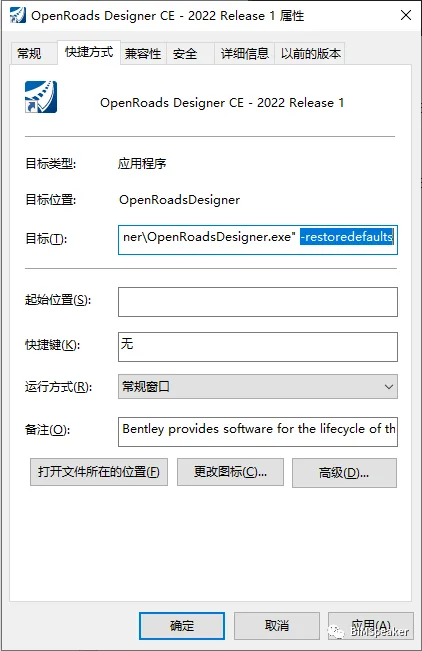
Right-click the software shortcut and select Properties. In the Properties window, add a space followed by -storedefaults after the content in the Target field, then click OK, as shown below:
Next, double-click the software shortcut again. You will see a command line window appear with the following message:
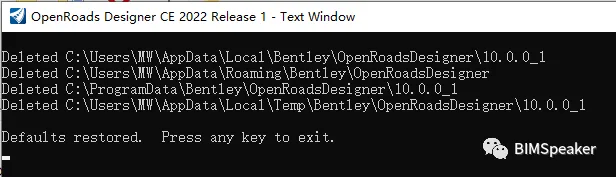
The message states: “Default restore. Press any key to exit.” After pressing any key, remove the added -storedefaults from the shortcut’s Target field using the same method, so the software can start normally.
This process deletes some temporary user files and functions similarly to a reinstall, thus it is called initialization.
Resetting OpenRoads Designer (ORD) Software Settings
In certain situations, you may want to reset the software’s initial settings completely. To do this, navigate to the following directories on your computer:
C:Users[Your Windows Username]AppDataLocalBentley
C:Users[Your Windows Username]AppDataRoamingBentley
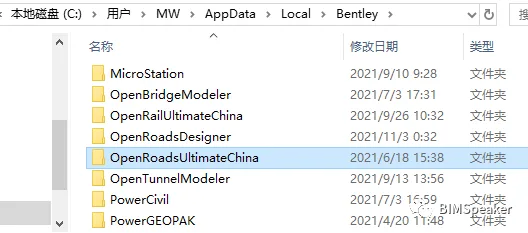
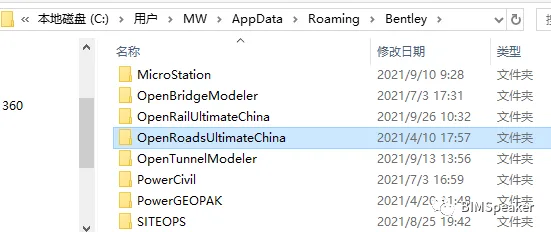
Within these folders, find and delete the folder corresponding to your OpenRoads version. For example, if you are using OpenRoads Ultimate China, delete the OpenRoads Ultimate China folder. This will reset the software, and the next time you open it, you will see a fresh interface.
Note that this method also works for other Bentley products by deleting their respective folders in these directories.
















Must log in before commenting!
Sign Up