
This article is authored by Yun Guixia Yin from the WeChat official account cgbridge.
The typical VRay workflow consists of three main steps:
1. Gathering scene object data
2. Calculating indirect lighting (Global Illumination, GI)
3. Calculating direct lighting
Collecting information about objects in the scene is usually a quick process. When calculating indirect lighting using the light map combined with the light cache method, the process first computes the secondary engine’s light cache, followed by the primary engine’s light map.
The light cache calculation process is illustrated below:
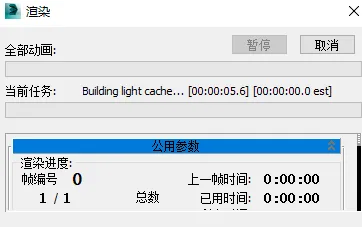
Building the light cache essentially means establishing a light cache for the scene.
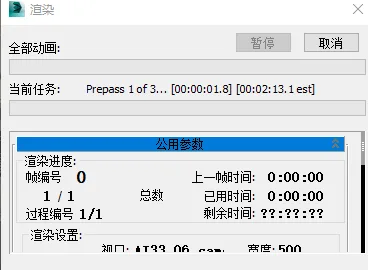
Once the light cache calculation is complete, the next step is to calculate the irradiance map, as shown below:
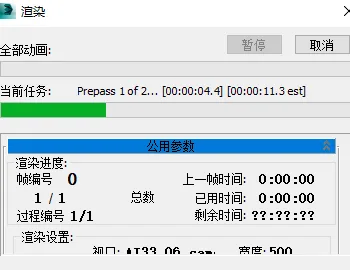
The irradiance map is scanned twice: once for Prepass 1 of 2 and once for Prepass 2 of 2. Why is it scanned twice? This relates to my specific settings, detailed below:
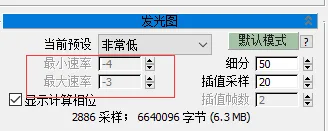
The minimum rate is set to -4 and the maximum rate to -3, which means the irradiance map engine performs two scans: one at quality level -4 and another at quality level -3.
Next, let’s change the preset to Medium:
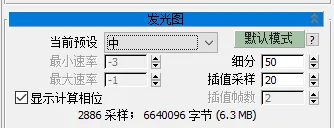
With this change, the minimum and maximum rates become -3 and -1 respectively, so the irradiance map will be scanned three times: at levels -3, -2, and -1. The slower the scan, the higher the sampling quality (i.e., more sampling points are processed in each pass).
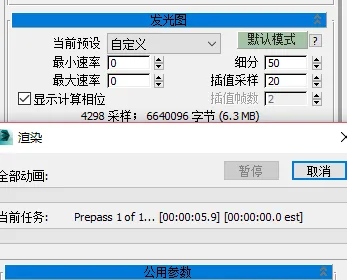
It’s important to note that the number of scans alone does not determine speed; the quality settings have a greater impact. For example, setting both minimum and maximum rates to 0 with a custom preset results in only one scan, as shown below (Prepass 1 of 1), but this scan is very slow due to the highest quality setting.
After calculating the indirect lighting information through the light cache and irradiance map, the direct lighting calculation begins, often referred to as “wiping the map.”
VRay’s entire calculation process is essentially the reverse of real-world lighting, where direct light hits objects and then bounces to create indirect light. In VRay, the indirect lighting first engine represents the first bounce of light, while multiple subsequent bounces are handled by the secondary engine.
Thus, VRay calculates in reverse order: secondary engine → primary engine → direct lighting.
Understanding this, the concept of rendering small images with large images becomes straightforward. It involves using the GI information from smaller images combined with the direct lighting from larger images to create the final render.
Practically, this means setting the output size to half of the final resolution when calculating GI and disabling the final image rendering (i.e., skipping direct lighting calculation):
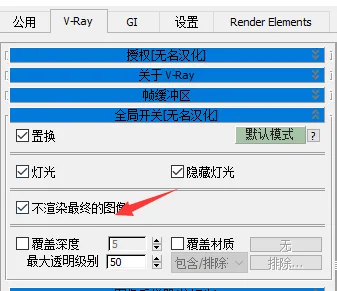
After this calculation, you can load the GI data by unchecking “Do not render the final image” and proceed with the full render.
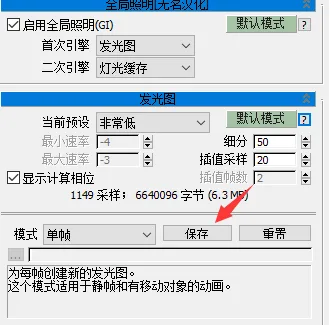
Saving and loading GI data is simple: after calculating GI, click “Save” in the irradiance map section. Once saved to disk, switch the mode to “From File” and load the saved irradiance map (disable the secondary engine) to produce the final render.
However, for single-frame rendering, there is usually no need to optimize rendering efficiency extensively. It is often more convenient to simply use cloud rendering services, allowing the process to complete over time without much concern.
















Must log in before commenting!
Sign Up