
This article is written by Yun Guixia Yin, the author behind the WeChat official account cgbridge.
Here, we will provide a simple overview of some common and useful parameters in VRay, focusing on clarity and practical understanding.
Let’s start with the GI panel, where the most frequently used combination is irradiance map and light cache. Both of these have subdivisions or segmented values that influence rendering quality.
Next, it’s important to note that lighting and material shaders also have subdivision values. These subdivisions control calculation accuracy—higher subdivision values mean more precise results. However, accuracy increases exponentially with subdivisions. For instance, a subdivision value of 8 corresponds to 64 calculation rays (8 squared), while increasing it to 30 means 900 rays. As accuracy improves, rendering speed decreases accordingly.
The irradiance map algorithm uses difference sampling to estimate values between sampled points rather than calculating every point directly. For example, if position A’s value is 3 and position C’s value is 5, and position B lies between A and C but is not sampled, the software estimates B’s value as 4 by interpolating between A and C. Increasing the number of difference samples results in smoother transitions without significantly affecting rendering speed.
This approach is called the adaptive subdivision algorithm, which is why irradiance map is commonly used as the primary engine. Another primary engine is the brute force (BF) algorithm, which does not use difference sampling and instead calculates every point exactly. While BF offers higher accuracy, it has a much slower rendering speed compared to irradiance map.
Now, let’s examine the parameters below the light cache settings:
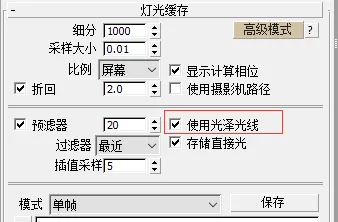
The “Use Glossy Reflections” option is enabled by default. This tells light cache to assist in calculating reflection blur. If disabled, reflection blur won’t rely on light cache, which can yield more accurate results but will slow down rendering. Generally, it’s best to leave this option at its default setting. The “Camera Path” option mentioned here is specifically for animation rendering.
Next, let’s review the global deterministic Monte Carlo settings:
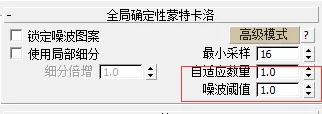
Here, a higher “Adaptive Amount” value means the algorithm relies more on adaptive sampling, which reduces calculation accuracy but improves speed. The “Max Noise Threshold” controls early termination of the algorithm to speed up rendering, where a larger value lowers accuracy. Both parameters have a global effect and usually don’t require adjustment. If you do change them, remember to reset them after making major scene changes.
Finally, let’s discuss one more option found in the VRay lighting panel—the “Store with Irradiance Map” setting:
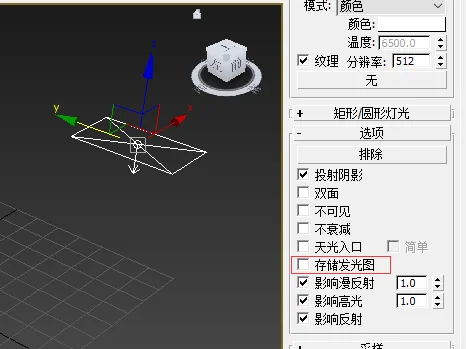
Enabling this option hands over the direct illumination calculation of the light to the irradiance map engine. This can speed up rendering significantly. The accuracy and speed still depend on your irradiance map settings, and the subdivision value will continue to affect calculation precision. The difference sampling method in the irradiance map ensures smooth, soft shadow transitions without noise. However, if the irradiance map quality is set too low, shadow accuracy will suffer.
















Must log in before commenting!
Sign Up