
Question:
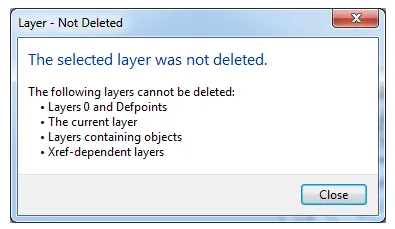
When trying to delete a layer in an AutoCAD drawing, you might see the following message, and the layer won’t be deleted:
The selected layer has not been deleted.
Layers that cannot be deleted include:
- Layer 0 and Defpoints
- The current layer
- Layers containing objects
- Layers linked to external references
Solution:
If the layer contains objects or is referenced by objects, it cannot be deleted.
If you are certain there are no such objects, try using the LAYDEL command to delete the layer:
- Type
LAYDELon the command line. - Type
Nor click on “Name”. - Select the layer you want to delete, then click “OK”.
Alternatively, try renaming the layer first, then attempt to delete it again.
Merging non-deletable layers into other layers:
In the Layer Manager, select the layer that cannot be deleted and right-click.
- Choose ‘Merge selected layers to…’, then pick the target layer to merge into.
Important note: Block definitions can also prevent layer deletion. Even if a block is removed from model or paper space, its definition remains in the drawing. Layers with active block references or definitions will continue to be considered ‘in use’ until all associated blocks and their definitions are fully deleted and purged.
















Must log in before commenting!
Sign Up