
In Revit, most objects are considered elements, including system families, family instances, family types, elevations, grids, views, and more.
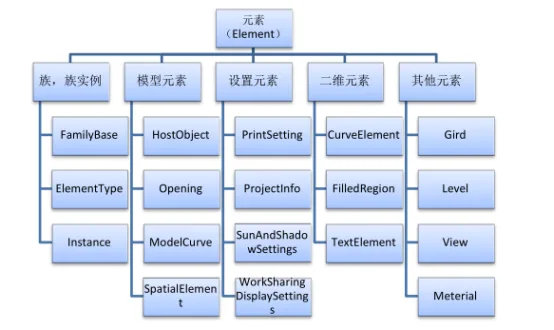
Most classes in Revit derive from elements, which can be categorized into three main types:
- System families: Built-in, non-editable families.
- Loadable families: Parameterized families that can be reused across multiple projects.
- Built-in families: Available only within the current project and typically have a single size.
Within the View Manager, element categories are organized into Model Category, Annotation Category, Analysis Model Category, and Import Category. This structure allows users to control the visibility of each element type within a view.
For example, when working with models that require engineering quantity calculations, focus is primarily on elements in the Model Category. Therefore, in the 3D view properties, only model elements need to be visible; other element types can be hidden or filtered out.
Based on relationships among related element classes, elements can be further divided into:
- Family: Corresponds to the Family class.
- Family type: Corresponds to the Family Symbol.
- Family instance: Corresponds to the Family Instance.
- Model elements: Include columns, walls, floors, roofs, annotations, pipes, rooms, and more.
- Setting elements: Include print settings, project information, sun and shadow settings, and collaborative display options.
- 2D elements: Only visible in 2D views.
To efficiently export bills of quantities for specific sub-projects, it is important to filter out unnecessary elements from the original model. This filtering facilitates element editing and data management.
In practice, if a model needs to be divided into zones or blocks for statistical purposes, element sets can be created based on element categories and attributes. These sets then serve as the basis for engineering quantity statistics within specified areas.
The classification of elements is illustrated in the image above.
Article by Fang Chao, Xi’an University of Architecture and Technology.
For learning and communication purposes only. Copyright belongs to the original author.
















Must log in before commenting!
Sign Up