
Currently, the collaborative design pattern is the most widely adopted approach, particularly well-suited for professional projects and smaller individual or sub-item tasks—such as constructing main structures with attached guard rooms or garbage rooms. By utilizing a unified set of templates and standards, this method enables highly efficient collaboration across different disciplines. Information flows bidirectionally between the central file and multiple local files through Revit’s synchronize command, ensuring data is updated promptly.
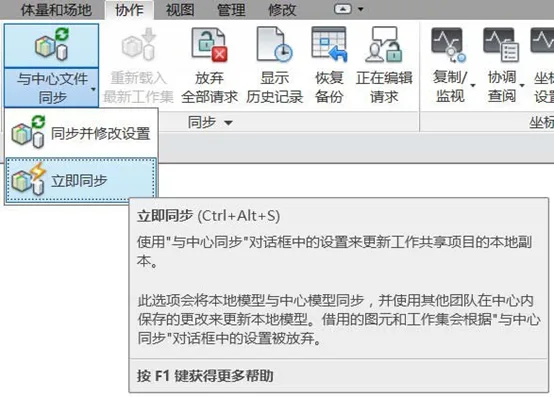
Figure 1: Revit Synchronize Command Interface
This collaborative design pattern allows team members to borrow editing permissions across different worksets, which places significant importance on the management of workset permissions. In individual building projects, worksets are typically divided by discipline and vertical zones—such as basement, podium, typical floors, and roof levels. Depending on the project’s specifics, worksets can be further subdivided by system or component categories to facilitate design workflows. For example, the plumbing discipline might be split into fire protection and non-fire protection systems, while the architectural discipline may be divided into curtain walls, civil engineering elements, and so forth.
A clear and well-structured division of worksets greatly enhances collaborative efficiency. However, experience shows that simply increasing the number of worksets does not always yield better results. Excessive subdivision demands high levels of coordination and can easily cause errors in assigning model elements to the correct worksets. Additionally, as the design progresses, model files grow larger, making synchronization with the central file more time-consuming and placing greater demands on hardware resources. Revit’s synchronization process is unique in that multiple users cannot synchronize simultaneously; synchronization must occur sequentially. During this process, others may experience delays or be unable to edit. Therefore, the optimal division of worksets should be determined based on the specific circumstances of each project.
Yu Kan is for learning and exchange purposes only. Copyright belongs to the original author.
















Must log in before commenting!
Sign Up