
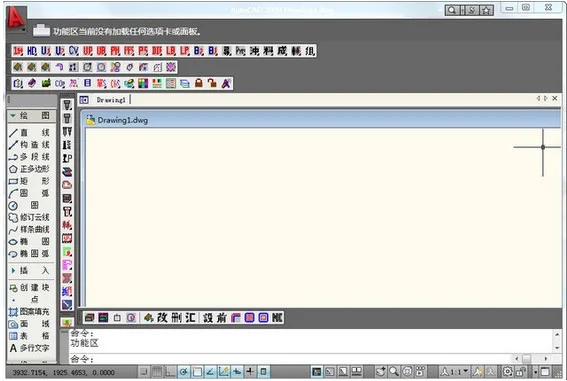
Muzi CAD Toolbox supports multiple versions of CAD software, offering quick online access to CAD shortcut keys and enabling users to view multiple document tabs simultaneously. This toolbox significantly enhances CAD operational efficiency, making it an essential tool for CAD designers.
How to Use
Muzi CAD Toolbox Shortcut Key Tips:
Ctrl (+): Toggle the display of the screen menu on or off.
Ctrl (-): Close the active document tab.
Ctrl (↑): Move the current tab to the front.
Ctrl (↓): Move the current tab to the end.
Ctrl (←): Move the current tab one position forward.
Ctrl (→): Move the current tab one position backward.
Software Features
1. Support for multiple document tabs.
2. Double-click to close documents.
3. Automatic tab sorting.
4. Context menu accessible via right-click.
5. Command line button integration.
6. Conversion of AutoCAD branch commands into button form.
7. Commands can be executed either by clicking buttons with the mouse or by typing the corresponding shortcut letters on the keyboard.












Must log in before commenting!
Sign Up