
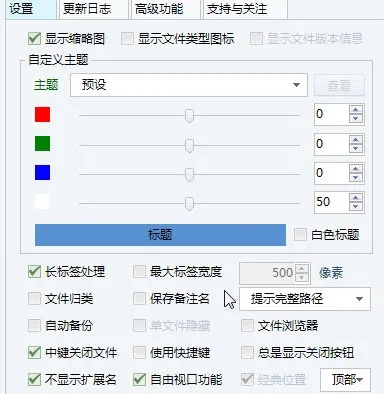
AutoCAD DuoTab enhances your CAD software with powerful multi-label editing capabilities. Beyond multi-label functionality, it offers file management, batch operations, clipboard management, batch printing, mouse gestures, automatic backups, and more. Additionally, it supports external plugin development, making it easy to manage other CAD plugins.
Instructions for Use
- The compatible AutoCAD versions are as follows:
- AutoCAD 2006: Use AutoCAD DuoTab for 2006.dll
- AutoCAD 2007–2008: Use AutoCAD DuoTab for 2007.dll
- AutoCAD 2009–2012: Use AutoCAD DuoTab for 2009.dll
- AutoCAD 2013–2016: Use AutoCAD DuoTab for 2013.dll
- Avoid placing plugins in system folders as permission issues may occur.
- Do not place the plugin in the root directory.
- Load the corresponding DLL using the Netload command in AutoCAD; the plugin will initialize automatically.
- Do not rename the DLL file.
- If loading fails, try unlocking the file in its properties.
- If there’s no response after the first load, restart AutoCAD.
- If the label background color does not match AutoCAD’s base color, select “Reinitialize” in the “Options – Advanced” tab.
Software Features
- Seamless Integration
The plugin integrates flawlessly with the AutoCAD interface, appearing as a native feature. It supports theme changes for a more vibrant and personalized look. - Built-in Functions
Includes file management, multi-file operations, clipboard functionality, automatic backups, batch printing of multiple files, scheduled scripts, floating menus, object information prompts, MagicHook, mouse gestures, synchronized scrolling, and LAN communication. - Plugin Development
DuoTab supports external plugin development with simplified interfaces and processes, efficient plugin management, versatile features, and flexible assembly options.












Must log in before commenting!
Sign Up