
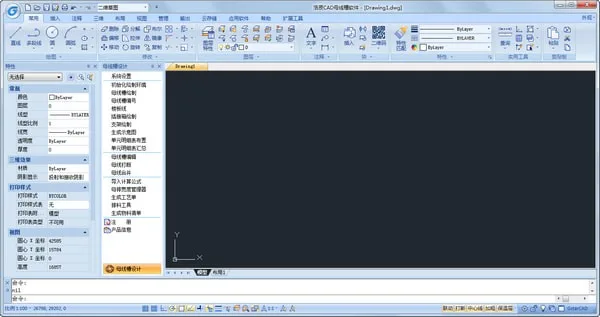
Haochen CAD Bus Duct is a specialized design software for creating routing and layout plans of bus ducts. Built on the Haochen CAD2018 platform, it features an intuitive 3D view that offers a vivid and clear visualization of designs. The software supports parameterized batch editing, significantly saving time and effort. Users can customize material calculation formulas and export detailed material lists with a single click, eliminating manual calculations and reducing human errors.
Software Features
1. Three-dimensional 3D view for clear visual presentation.
2. Parametric line editing for fast drawing and easy modifications.
3. Customizable objects to suit diverse design requirements.
4. Integrated data management ensuring unified graphics and data consistency.
5. Custom calculation formulas tailored to individual needs.
6. One-click export and summarization of material lists.
Feature Overview
Main Functions
1. Bus Duct Drawing
Users can set and edit specifications and parameters for components such as starting boxes, bus ducts, elbows, tees, and more during the drawing process, allowing precise creation of bus equipment with varying parameters.
2. Bus Duct Editing
The software supports multiple editing methods including multi-segment and overall editing. Material properties and dimensions can be adjusted easily, and annotations can be batch edited quickly and efficiently.
3. Plug-in Box Drawing
Plug-in boxes can be accurately positioned on the bus duct. Users can configure the product model, rated current, length, width, and height as needed, with automatic adjustments to the 3D graphics.
4. Custom Calculation Function
This feature covers standard bus duct calculation methods but allows customization to fit the specific needs of different organizations and projects, reducing calculation errors and manual workload.
5. Automatic Process Sheet Generation
Based on user-defined process sheet content, the software can automatically generate detailed tables, including busbar and shell processes, enabling fast, accurate, and efficient statistics.
6. Scheduling and Material Tools
The software automatically schedules materials to meet processing requirements and generates final material lists based on scheduling data. This guides production and procurement, effectively streamlining tedious statistical tasks.
7. Bracket Drawing
Equipped with horizontal and vertical support as well as hanger design functions, the software allows selection from various types of supports and hangers based on project needs.
8. System Settings
Users can systematically configure specifications, models, and current ratings of busbars, brackets, and plug-in boxes involved in busbar trunking design to meet diverse design requirements.
9. Calculation and Report Settings
The software performs calculations according to user-defined settings and automatically generates detailed reports. Report contents can be customized for improved convenience and speed.












Must log in before commenting!
Sign Up