
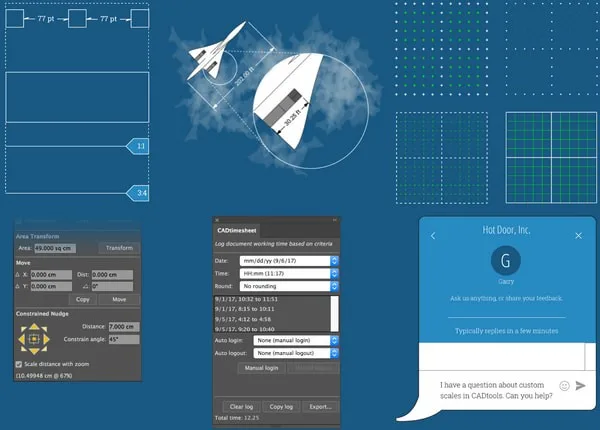
Hot Door CADTools is a plugin package designed for Adobe Illustrator to facilitate CAD engineering drawings. With CADTools, you can easily create precise CAD graphics within Adobe Illustrator. This plugin integrates a comprehensive set of engineering drawing tools, allowing you to draw illustrations of any size complete with detailed annotations using simple mouse clicks.
Software Features
1. Draw, Annotate, and Mark at Any Scale
Click and drag dimensions or labels on any object, path, or point in space. The measurements update in real time and respond dynamically to artwork changes.
2. Seamless Integration with Illustrator Tools
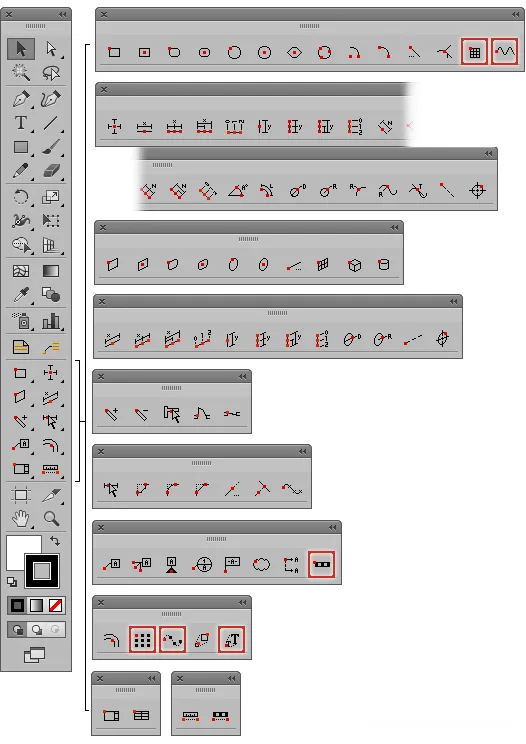
CADTools adds 92 tools across 10 groups to Illustrator’s toolbar, including drawing, editing, annotating, dimensioning, converting, creating, and utility tools.
3. Intuitive Click-and-Drag Tool Usage
The added tools feature red dots indicating the number and position of mouse clicks needed to edit or create objects, labels, or dimensions. New tools include zoom line, repeat, repeat along path, zoom type, grid, and waveform.
4. Document and Layer Scale with Scale Calculator
Select from a variety of engineering and construction scales or create unlimited custom scales. The built-in scale calculator simplifies determining proportions.
5. Unlimited Sizes and Label Styles
Create precise, real-time dimensions for measurements, letters, numbers, or custom text. Design custom labels using text, numbers, letters, or object geometry.
6. 3D Style Cubes, Cylinders, and Planes
Generate artwork with custom 3D perspectives using CAD axonometric panels. Use axonometric dimension tools to annotate dimensions or flatten views into front, side, or plan projections.
7. Comprehensive CAD Units
Define unit types and precision for size values, numerical input, CAD rules, and tool panel options. Utilize compact sections to refine professional documents.
8. Custom Guides and Grids
Create and capture custom scales and grids with CAD drawing tools. Enable full-screen cursor display for easy creation and editing of CAD tool objects.
9. CAD Shortcuts and Automatic Sizing
Use the CAD Shortcuts panel to instantly apply dimensions. Save time with custom presets that retain your CAD tool settings.
10. Proportional Measurement and Transformation
Employ CADTracker to digitally move and transform objects. View angles, perimeters, lengths, and areas of multiple paths or placed images.
11. CADDashboard and CADHelp
Quickly access all tools and panels via CADDashboard. The context-sensitive CADHelp panel provides detailed step-by-step guidance and video tutorials for the active tool or panel.
12. Installation and Supported Illustrator Versions
Install Adobe Illustrator 2019 properly, then copy the plugin (.aip) file to the AI plugin directory located at the default path: C:Program FilesAdobeAdobe Illustrator CC 2019Plug-ins (productivity tool), depending on your installed version.
Version Compatibility
AI23_64 — Adobe Illustrator CC 2019 64-bit
AI22_64 — Adobe Illustrator CC 2018 64-bit
AI21_64 — Adobe Illustrator CC 2017 64-bit
AI20_64 — Adobe Illustrator CC 2015.3 64-bit
AI19_64 — Adobe Illustrator CC 2015 64-bit
AI18_64 — Adobe Illustrator CC 2014 64-bit
AI17_64 — Adobe Illustrator CC 64-bit
AI16_64 — Adobe Illustrator CS6 64-bit













Must log in before commenting!
Sign Up