
The One Click Staircase Plugin consists of three components: One Click Staircase, One Click Staircase Plan Experience Edition, and One Click Staircase Board. It is designed to quickly generate structural stairs, significantly reducing the workload for drafters. Mastering this plugin can dramatically boost your stair drawing efficiency.
Software Features
For many users, one-click tools feel like magical helpers. Even experienced users rely on these tools because they significantly enhance design efficiency. If you have access to a cloud E-library filled with efficient design plugins, you won’t want to miss these incredible tools: One Click Staircase, One Click Skirting Board, One Click Floor, One Click Roof, One Click Window Frame, One Click Bookshelf, One Click Lighting, One Click Material Subdivision, and more. All these one-click generation plugins are available through the 3D Academy. Let’s dive in and start using the One Click Staircase plugin!
This plugin allows you to create various staircase designs, including straight single-run stairs, straight multi-run stairs, parallel double-run stairs, zigzag multi-run stairs, spiral stairs, and curved stairs.
Instructions for Use
Slide Show Setup:
1. Copy all slide files from the slide collection folder into the Support folder of your CAD installation directory.
2. Copy all SHX font files from the font folder into the FONT folder within your CAD installation directory.
One Click Staircase:
1. Copy the font files from the font folder to the CAD installation directory’s font folder.
2. Use the APPLOAD command to load the plugin, then enter YL to run it.
3. The program offers two modes of operation:
• Directly select all parameters to generate a staircase profile.
• Input parameters through an interactive interface to create a staircase profile.
4. Modify the auto-generated stair section as needed, then scale it up to twice its size to create a block.
5. By default, the program generates AT-type stairs. To quickly switch to another type, use the companion program called “One Click Ladder Board.”
One Click Staircase Plan Experience Version:
The gray button “Kexing” is designed for the plugin “One Click Stair Plan Experience Version (Command: LP).vlx” and helps overcome limitations of the trial version.
Usage steps:
1. Open CAD and run the command LP. A dialog box for the One Click Stair Plan Experience Version will appear (all buttons are initially gray).
2. Run the “Gray Button Buster Enhanced Version” and check the two bottom options within the dialog box (leave the top two unchecked).
3. Click anywhere on the One Click Stair Plan Experience Version dialog box. The buttons will activate, unlocking the full functionality.
One Click Ladder Board:
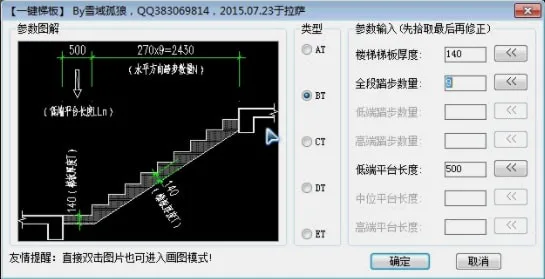
1. This program is launched using the command TB.
2. It is a companion utility for the One Click Staircase plugin, designed to quickly modify stair treads. It can generate five types of stair treads: AT, BT, CT, DT, and ET.












Must log in before commenting!
Sign Up