
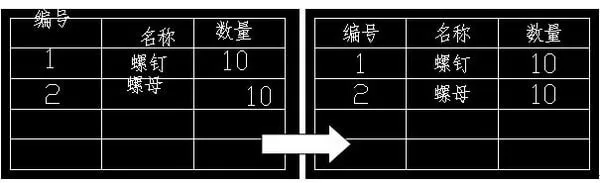
The Text Centering Plugin for CAD tables is a useful tool that allows users to center text horizontally within table cells with a single click. This plugin simplifies the process of standardizing text formatting across tables, making it a practical and convenient addition for users who need it.
Basic Introduction
Function Overview: When creating tables using lines and single-line text, the text alignment within the table cells often appears inconsistent. This plugin centers all text within the selected table cells simultaneously, ensuring uniform alignment.
Compatible Software: AutoCAD Haochen CAD
How to Use
1. Enter the AP command, then browse and load the file “Center Text in Table.LSP” in the dialog box.
2. Use the WZJZ command (which stands for the first letters of the Chinese phrase for “center text”) to activate the plugin.
3. Select the text within the table that you want to center by using box selection. Once confirmed, the plugin will automatically center the text within the table cells.












Must log in before commenting!
Sign Up