
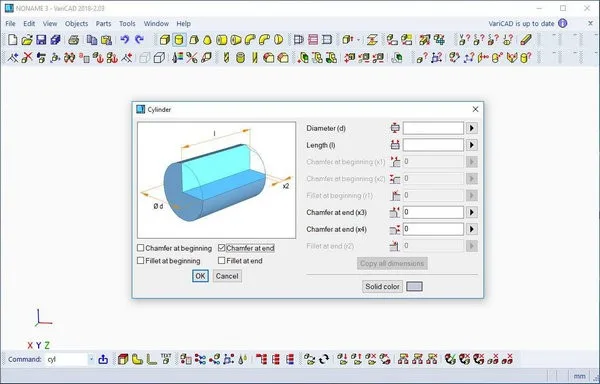
VariCAD 2019 is a precision CAD software designed for computer-aided machine engine development. Using VariCAD to develop specialized industrial products or to create 3D product drawings can significantly speed up your drafting process while improving accuracy. This allows you to bring new products to market faster than your competitors.
Basic Introduction
VariCAD is a comprehensive 3D/2D CAD software primarily used in mechanical engineering design. It integrates all necessary tools for designers to quickly create, evaluate, and modify their models. Offered as a fully featured package at an affordable price, VariCAD delivers exceptional value, making it one of the smartest choices in today’s CAD market.
Software Features
1. User Interface and System Environment: VariCAD’s graphical user interface (GUI) is designed for fast and intuitive 3D/2D navigation. The interface reflects the designer’s workflow, enabling efficient capture and communication of design intent with minimal steps.
2. 3D Modeling: You can start by creating a 3D model, which can then be used to automatically generate drawing files or 2D sketches. Designing in 3D feels more natural as it represents actual parts and assemblies, offering a more intuitive approach compared to 2D drafting. The 3D model can be easily converted into traditional 2D documentation. VariCAD also updates 2D drawings automatically within two days of changes made to the 3D model.
3. 3D Shapes: VariCAD includes a library of basic 3D shapes such as boxes, cylinders, and cones, which can be easily modified by adjusting their dimensions. You can create solids through contour rotations, extrusions, or layouts. Advanced tools allow operations like lofting between two contours, smoothing transitions between different shapes, and creating right-angled surfaces.
Entities can be combined or subtracted to form Boolean trees representing mechanical parts. Boolean operations can be set to automatic selection mode. You can define operations like drilling, surface milling, or groove milling. Edges can be rounded or chamfered. Various types of solid transformations and editing options are also supported. Additionally, you can edit the Boolean tree by selecting solid parts either directly from the 3D model or from a structured list.
4. Parameters and Geometric Constraints: VariCAD allows you to selectively apply geometric constraints to entities or their components. Once defined, these constraints ‘lock’ objects in place, removing degrees of freedom. If other connected objects are modified, the constrained objects adjust automatically. For example, if a shaft length changes, a pressure point attached to the shaft will maintain a constant distance from its end. Constraints can be applied between entity elements, entire entities, or within contours. When entering dimensions, constraints, or distances for 2D profiles used in solid creation, you can use parameters or mathematical expressions. Changing parameter values dynamically alters the shape or position of the solid.
5. 3D Assembly and Grouping: VariCAD offers robust support for assemblies. When a connection between components is established, any changes made to one part automatically reflect in the assembly and vice versa. Linked solid copies, or identical solids, can be defined so that editing one instance updates all copies. Groups of solids can be managed together to easily change visibility or selection. A valuable feature is the interference check for 3D assemblies, which detects overlapping volumes between components.
6. Calculation and Analysis: VariCAD can calculate 2D cross-sectional areas, surface areas, volumes, mass properties, center of gravity, and moments of inertia. It also supports mechanical part calculations commonly needed by designers, including pressure and compression, tension connections, loose and parallel keys, grooved shafts, bearings, combined bending and twisting stresses, as well as spur and helical gear geometries.
7. Surface Development (Sheet Metal Unfolding): VariCAD can generate developed surfaces for unfolding 3D solids or sheet metal parts. The XY coordinates of developed surfaces can be exported as text files for further processing. You can input coefficients during unfolding calculations to reflect specific materials and manufacturing technologies. The software includes a comprehensive library of standard mechanical parts (ANSI, DIN), such as bolts, nuts, pins, plugs, cotter pins, gaskets, bearings, rolled and stretched profiles, as well as hydraulic, pneumatic, electrical, and symbolic components.
8. 3D to 2D Export: VariCAD converts 3D models into 2D drawings for standard drafting documentation. You can create 2D views of one or multiple entities by defining views directly in the 3D model. Specific parts can also be output separately. After 3D modifications, VariCAD automatically updates the corresponding 2D drawings.
9. 2D Drawing and Editing: The software’s graphic features are optimized for engineering ease-of-use. Key functions include automatic object and snap point detection, snap mode, auxiliary construction lines, orthogonal mode, and rectangle drawing tools.












Must log in before commenting!
Sign Up